

TL;DR:
- Digital business cards generate 700% more reciprocal exchanges than paper cards and can be updated instantly without reprinting. They offer cost savings, analytics, CRM integration, and environmentally friendly features, making them a strategic choice for modern SMEs. However, a hybrid approach is often optimal, combining digital and traditional cards based on context and audience preferences.
Paper cards still dominate networking events, yet digital cards drive 700% more reciprocal exchanges than their printed counterparts. That single figure should make any growth-minded SME pause. Traditional business cards are bulky to manage, expensive to reprint, and impossible to track. Virtual business cards flip all of that on its head, giving you real-time updates, analytics, and seamless CRM integration in a format that fits any screen. This guide walks you through exactly what virtual business cards are, how they work, where they fall short, and how to apply them practically in your business.
Table of Contents
- What are virtual business cards?
- How do virtual business cards work?
- Virtual business cards vs. paper cards: What the data shows
- When digital cards aren’t perfect: Limits and hybrid strategies
- How SMEs and digital businesses get more from virtual business cards
- Why going fully digital isn’t always the best move—for now
- Take the next step with smarter business tools
- Frequently asked questions
Key Takeaways
| Point | Details |
|---|---|
| Paperless contact sharing | Virtual business cards let you update and instantly share contact info, saving time and resources. |
| Proven ROI for SMEs | Digital cards enable faster networking and can save teams thousands each year over paper solutions. |
| Not always one-size-fits-all | Physical cards may still be best for high-touch situations or conservative industries. |
| Hybrid approach works | Pairing digital and paper cards can optimize both reach and professional impact. |
What are virtual business cards?
Before exploring the specific benefits for your business, it is essential to clarify what virtual business cards are and how they work.
Virtual business cards are electronic versions of traditional cards that share contact information through QR codes, NFC (near-field communication), or digital wallets. Unlike a printed card that becomes outdated the moment your phone number changes, a virtual card connects to a live profile you can update instantly without reprinting anything.
The core mechanics are straightforward. You create a digital profile that can live as a vCard file, a cloud-hosted web page, or a wallet entry in Apple Wallet or Google Wallet. When someone scans your QR code or taps an NFC-enabled card, they see your most current information immediately. No printing delays, no wasted stock, no version confusion.
Key features that set virtual business cards apart include:
- Instant updates: Change your title, email, or phone number once and every recipient sees the new version automatically.
- Multiple sharing channels: QR codes, NFC taps, short URLs, Apple Wallet, and Google Wallet all work simultaneously.
- Zero paper waste: No print runs, no reorders, and no landfill contributions from outdated cards.
- Analytics and tracking: Many platforms tell you how many people viewed your card and clicked your links.
- Brand consistency: Your logo, colors, and formatting stay uniform across every team member’s card.
“The most powerful thing about a virtual business card isn’t the technology. It’s the fact that your contact information is always current, for every person who has ever received it.”
Sharing mechanics include QR codes, NFC, URLs, and wallet integration with centralized updates, meaning one change propagates everywhere instantly. That single feature alone eliminates one of the most frustrating problems in traditional business networking: the outdated contact.
How do virtual business cards work?
Now that you understand what virtual business cards are, let’s detail how you create and use them in practice.
The process is simpler than most people expect. Here is a step-by-step breakdown:
- Choose a platform. Select a digital business card provider that fits your team size, integration needs, and budget. Look for platforms that support sharing without requiring the recipient to download an app.
- Build your profile. Add your name, job title, company, contact details, social media links, website, and any other relevant information. Upload a profile photo and company logo for professional polish.
- Select your sharing format. Decide whether you want a QR code, an NFC-enabled physical card, a shareable URL, or all three. Most modern platforms support every option simultaneously.
- Share your card. In a meeting, pull up your QR code on your phone. At a conference, tap your NFC card against the recipient’s phone. In an email or Slack message, paste your link. The recipient saves your details with a single tap or click.
- Update anytime. Log into your platform dashboard, change whatever needs changing, and every version of your card updates in real time.
Profiles can live as vCards or cloud-hosted pages and update centrally, which means your team never needs to chase down old versions or reprint batches of cards after a rebrand.
Here’s a quick comparison of the three primary sharing methods:
| Method | Best use case | Device requirement | Ease for recipient |
|---|---|---|---|
| QR code | Events, in-person meetings | Any smartphone with camera | Very easy |
| NFC tap | Executive networking, trade shows | NFC-compatible device required | Extremely fast |
| URL link | Email, chat, remote meetings | Any browser-enabled device | Universally simple |
Pro Tip: Pick a platform that enables card sharing with no app required on the recipient’s end. Anything that creates friction for the person receiving your card reduces the chance they’ll actually save your details.
For SMEs that also manage team expenses and payments, understanding how SME finance teams issue virtual cards is a natural next step, since the same digital-first mindset that drives better networking also drives better financial control.

Virtual business cards vs. paper cards: What the data shows
Understanding the practical workflow leads naturally to evaluating the actual business value. Let’s compare digital with traditional cards using hard data.
The numbers are genuinely striking. Digital business cards drive 4 to 5 times higher conversion rates and 700% more reciprocal exchanges than paper cards. That’s not a marginal improvement, that’s a fundamentally different networking outcome.
The cost comparison is equally compelling. Paper cards cost between $200 and $500 per employee per year, factoring in design, printing, reprints after information changes, and disposal of outdated stock. Digital alternatives run from $0 to $48 per user annually on most major platforms. For a team of 100 employees, switching to digital can save up to $30,000 every year, money that goes directly back into operations, marketing, or growth.
Here’s a side-by-side look at what you actually get with each format:
| Feature | Paper cards | Virtual business cards |
|---|---|---|
| Cost per employee/year | $200–$500 | $0–$48 |
| Update ability | Reprint required | Instant, no cost |
| Analytics and tracking | None | Full view and click data |
| CRM integration | Manual entry | Automated capture |
| Environmental impact | High paper waste | Near zero |
| Networking reciprocity | Baseline | Up to 700% higher |
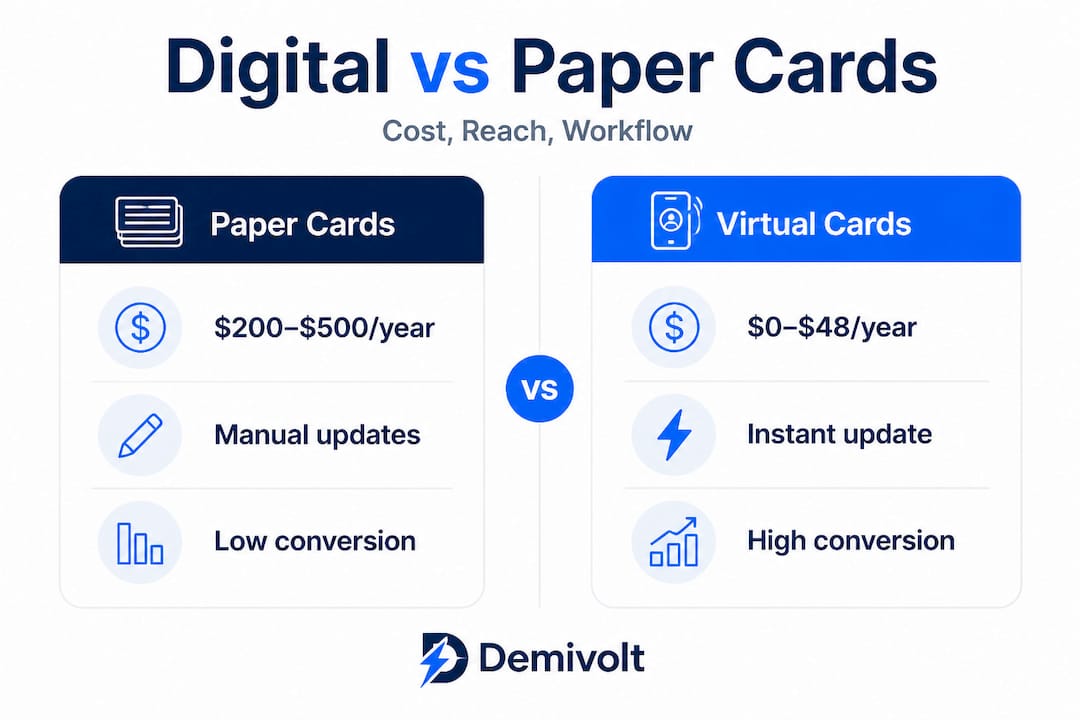
Beyond cost, digital cards enable centralized updates, analytics, and CRM integration to boost lead capture in ways paper simply cannot replicate. When you hand someone a paper card, you have no idea if they ever looked at it again. When you share a digital card, you can see exactly when they visited your profile and which links they clicked. That data turns passive networking into a measurable pipeline activity.
For SMEs already working to streamline their digital banking and operations, adding virtual business cards to the mix is a logical extension of the same efficiency-first mindset.
Additional advantages worth noting for digital-first businesses:
- Team-wide consistency: Onboard a new employee and generate their branded card within minutes.
- Remote and hybrid work fit: Share cards seamlessly in video calls, Slack channels, and email signatures.
- Event-ready QR codes: Display your QR code on a conference badge, presentation slide, or email footer simultaneously.
- Real-time lead routing: Some platforms push new contacts directly to your CRM the moment someone saves your card.
When digital cards aren’t perfect: Limits and hybrid strategies
Despite the advantages, it is also critical to address where virtual business cards may fall short and how to handle those situations smartly.
NFC requires compatible devices, and not all recipients are comfortable or even have access to NFC-enabled phones. Privacy and compliance concerns also exist, particularly in regulated industries or regions with strict data protection rules. And NFC-enabled physical cards, while impressive, do carry upfront hardware costs that basic printed cards do not.
There are a few clear situations where going fully digital may create friction rather than reduce it:
- Conservative or traditional industries: Legal, finance, and government sectors often expect a tangible card as a signal of credibility.
- Older professional demographics: Some senior executives still prefer paper, and forcing a digital interaction can feel impersonal.
- Poor connectivity environments: At remote trade events or rural locations, relying on internet-dependent card pages can backfire.
- Privacy-sensitive contexts: If your role requires discretion, sharing a trackable digital profile may raise eyebrows from cautious contacts.
For executive and B2B settings, tactile impact still matters, and research suggests the break-even point for going fully digital is around 200 to 300 annual contacts. If your team exchanges fewer contacts than that per year, the cost savings may be modest, and the impression left by a premium printed card might deliver better ROI for that specific audience.
The smartest approach for most SMEs is a hybrid strategy: pair QR codes or NFC chips with premium paper stock for high-stakes, executive-level meetings, while using pure digital sharing for remote, high-volume, or millennial-dominated networking contexts.
Pro Tip: Start small. Pilot virtual cards with your sales or business development team, measure engagement analytics for 60 days, then decide whether to roll out company-wide or maintain a hybrid model for specific roles.
“Hybrid approaches offer tactile advantages and broader reach, while digital tools deliver the analytics and cost savings that modern businesses need to justify every networking dollar.”
For businesses going through rapid growth or compliance-heavy onboarding, understanding efficient fintech onboarding processes is equally valuable as you build out digital-first workflows across every touchpoint.
How SMEs and digital businesses get more from virtual business cards
With the pros, cons, and hybrid options laid out, here’s how to make the most of virtual cards in practical business scenarios.
The real value of virtual business cards for SMEs isn’t just in the sharing. It’s in what happens after the share. Digital cards enable quick sharing in hybrid settings, CRM integration, and analytics, which streamlines contact management in ways that paper cards simply cannot support at scale.
Here’s a practical workflow that high-performing SME teams use:
- Share digitally at first contact. Whether in person, on a call, or at an event, share your virtual card via QR, NFC, or link immediately.
- Capture contact data automatically. If your platform supports it, set up two-way exchange so the new contact’s details flow directly into your CRM without any manual data entry.
- Tag and segment new contacts. Assign tags based on event, industry, or deal stage so follow-up sequences can be personalized.
- Trigger your follow-up workflow. Many platforms integrate directly with tools like Salesforce, HubSpot, or Pipedrive, firing an automated follow-up email within minutes of the exchange.
- Monitor engagement analytics. Track which contacts revisited your profile, clicked your website link, or shared your card further. Use that data to prioritize warm leads.
Consider this scenario: your sales director attends an industry conference, changes her job title mid-event because a promotion just went through, and needs her card to reflect that immediately. With a virtual card, she updates her profile in 30 seconds from her phone. Every QR code she shared that morning now shows her new title. With a paper card, she’d be handing out inaccurate information for weeks.
Prioritize platforms with native wallet support, no-app-required sharing, and strong analytics for the best results across your team. Those three features separate the platforms that deliver measurable ROI from those that are just digital novelties.
Pro Tip: If your team already uses Salesforce or HubSpot, look for a virtual card platform that offers a native integration rather than relying on Zapier workarounds. Native integrations are more reliable, faster, and less likely to break when either platform updates. When you’re ready to set up SME virtual cards alongside your financial tools, having both systems talk to each other directly saves significant time.
Why going fully digital isn’t always the best move—for now
Most guides on virtual business cards skip straight to “go all-in.” We disagree, and here’s why that advice misses a critical nuance.
The businesses that get the best results from virtual business cards aren’t the ones that eliminated paper overnight. They’re the ones that studied their customer journey, identified where digital actually adds value, and made deliberate choices about when to use which format. That’s not caution. That’s strategy.
Hybrid approaches deliver tactile advantages and broader reach while digital tools provide the analytics and cost savings that modern finance teams can actually report on. A premium paper card handed to a CFO at a private dinner signals preparation and substance. The same CFO receiving a QR code at that same dinner might find it jarring or overly casual.
The uncomfortable truth is that going digital-first is not a universal upgrade. It is the right move in the right context. For a SaaS company networking with other tech founders, virtual cards are table stakes. For a boutique legal firm building relationships with conservative corporate clients, pushing digital too hard can undermine credibility before the conversation even starts.
What we recommend is an audience-first framework. Map your key networking contexts, identify who you’re meeting and what signals they expect, and assign your card format accordingly. Use analytics from your digital sharing to learn what’s working, and adjust your hybrid ratio over time based on real data, not assumptions.
Digital-first is a journey, not a switch. The SMEs that streamline digital banking and adopt virtual cards simultaneously are building an integrated operational efficiency that compounds over time. But they do it incrementally, measuring outcomes at each stage rather than overhauling everything at once.
Take the next step with smarter business tools
If you’re ready to streamline networking and finance workflows, here’s how Demivolt helps you get started.
Virtual business cards are just one piece of a larger digital-first business infrastructure. When your networking tools, expense management, and banking platform all work together, the efficiency gains multiply fast.
At Demivolt, we help SMEs and digital-first businesses build exactly that kind of integrated infrastructure. From digital business banking solutions with dedicated IBAN accounts and SEPA-ready payments, to virtual and physical cards for team expense management, every tool is built for modern operational speed. If you want to go further, explore how to set up or optimize your virtual cards alongside your full business banking setup. The smarter you connect your tools, the less time your team spends on admin and the more time they spend closing deals.
Frequently asked questions
What information can I include on a virtual business card?
Virtual business cards can store contact details, social media links, websites, job title, company info, and more, all updatable instantly without reprinting.
Are virtual business cards more secure than paper cards?
They can be more secure if the platform includes privacy controls and GDPR compliance, but digital cards carry privacy risks if not properly configured.
Do I need an app to use or receive a virtual business card?
Many platforms enable sharing without any app requirement on the recipient’s end, though some advanced analytics features may need internet access.
What’s the cost of switching my team to digital business cards?
Digital cards cost $0 to $48 per user annually, compared to $200 to $500 per employee for traditional paper cards, representing significant savings at any team size.