

What is role-based access control and how do you set it up?
Role-based access control (RBAC) is an authorization model that restricts system access to authorized users based on predefined roles rather than individual identities. Instead of assigning permissions directly to each person, you define roles that reflect job functions, attach permissions to those roles, and then assign users to the appropriate role. The result: access follows organizational structure, not manual configuration per person.
RBAC is governed by three primary rules that every implementation must satisfy:
- Role assignment — a user can exercise a permission only after being assigned a role.
- Role authorization — a user’s active role must be explicitly authorized for that user.
- Permission authorization — a user can exercise only the permissions authorized for their active role.
Setting up role-based access in your organization follows a clear sequence:
- Identify roles aligned to actual job functions, not org-chart titles.
- Define permissions for each role under the principle of least privilege.
- Map users to roles through a central identity provider (Active Directory, Okta, Azure AD, or similar).
- Validate assignments with a pilot group before full deployment.
- Schedule periodic audits to remove unused permissions and catch privilege creep.
This structure reduces administrative overhead significantly. Rather than managing hundreds of individual access lists, administrators manage a far smaller set of roles, and user lifecycle management becomes a matter of role assignment, not permission-by-permission configuration.
Table of Contents
- Why role-based access control is critical for security and compliance
- Core principles and models you need to understand before configuring permissions
- Best practices for implementing role-based access control effectively
- How RBAC compares to other access control models
- Expert insights and industry standards that strengthen your RBAC design
- How to set up role-based access in Windows Active Directory and cloud platforms
- How to integrate RBAC with your existing IAM systems
- Which tools help you manage and automate RBAC at scale?
- How to keep your RBAC system effective over time
- Demivolt brings role-based user management to your financial operations
- Key Takeaways
Why role-based access control is critical for security and compliance
RBAC’s value extends well beyond convenience. It directly addresses two of the most persistent risks in enterprise security: unauthorized access and privilege creep, where users accumulate permissions over time that they no longer need.
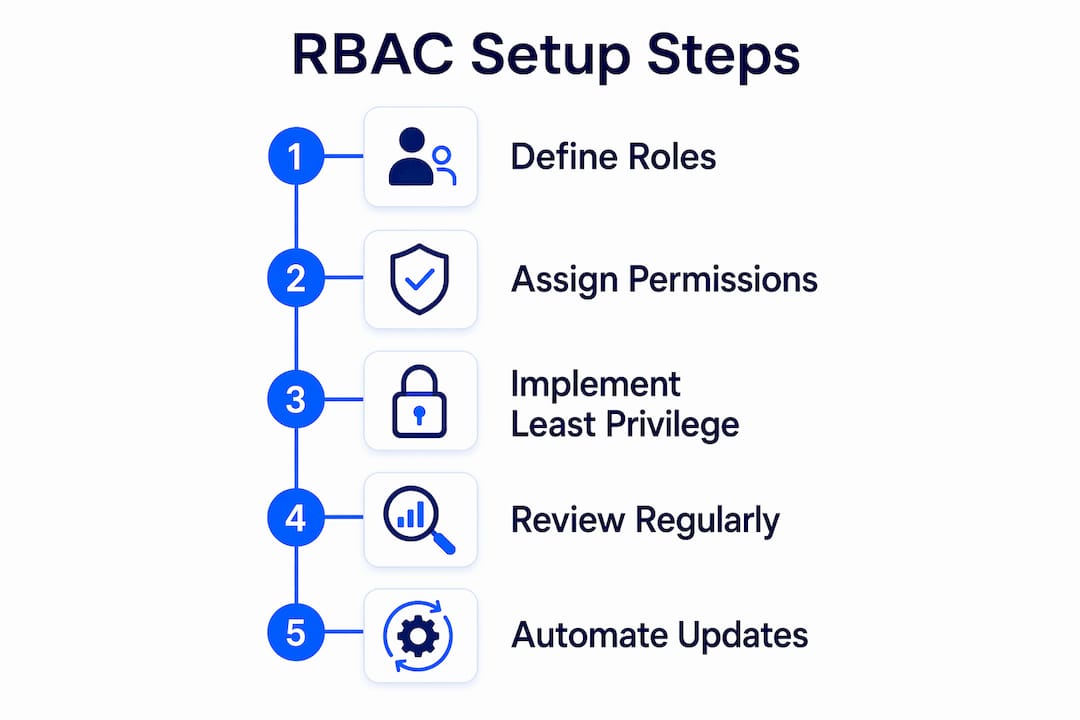
RBAC improves scalability and compliance by automating onboarding and offboarding, reducing administrative overhead, and mitigating privilege creep risks. When an employee changes departments or leaves the organization, a single role reassignment or removal revokes all associated permissions simultaneously. Without RBAC, that same change might require dozens of manual updates across multiple systems.
From a regulatory standpoint, RBAC aligns directly with several major compliance frameworks:
- NIST SP 800-53 includes RBAC under Access Enforcement controls (AC-3(7)), making it a recognized control for U.S. federal agencies and organizations following federal security standards.
- PCI DSS Requirement 7 mandates that access to cardholder data be limited based on job classification and function, which RBAC satisfies by design.
- HIPAA technical safeguards reference role-based access as a mechanism for protecting electronic protected health information.
- CIS Controls (Control 6) — Access Control Management — frequently incorporates RBAC as a core implementation practice.
The efficiency gains are equally concrete. Grouping permissions into roles rather than managing access individually per user accelerates onboarding and simplifies permissions adjustments when job functions change.
Core principles and models you need to understand before configuring permissions
RBAC is built on four foundational elements: users, roles, permissions, and sessions. A session maps a user to one or more active roles at any given time, and permissions flow from those roles, not from the user directly. This indirection is what makes the model both secure and scalable.
Role hierarchies extend this foundation. A senior role can inherit all permissions of subordinate roles, mirroring an organization’s reporting structure. A department manager’s role, for example, might inherit read and write access from a team member role while adding approval permissions on top. The NIST/ANSI/INCITS RBAC standard formalizes three levels of RBAC:
- Core RBAC — the required baseline; users get roles, roles get permissions.
- Hierarchical RBAC — adds role inheritance to reflect organizational structure.
- Constrained RBAC — adds separation of duties (SoD) to prevent conflicting access rights.
Separation of duties is particularly important in financial and regulated environments. A classic SoD constraint prevents the same user from both creating a payment and approving it, a safeguard that RBAC enforces structurally rather than relying on policy alone.
Pro Tip: Map roles to technical functions, not HR job titles. A title like “Senior Analyst” may change with a promotion, but the underlying function of “read-only access to production databases” stays stable. Roles built around functions require far less maintenance over time.
Best practices for implementing role-based access control effectively
Step-by-step implementation process
Effective RBAC implementation requires defining organizational roles by job functions, assigning permissions per least privilege, then mapping users to roles through a central identity provider, while allowing time for propagation across systems. Here is the full sequence:
- Conduct a role discovery audit. Interview department heads and review existing access control lists to understand what permissions each function actually requires.
- Define roles top-down and bottom-up. Start with broad categories (administrator, specialist, end user), then refine based on functional needs discovered in the audit.
- Assign permissions under least privilege. Grant the minimum access necessary for each role to perform its function. Expand only after validation.
- Implement roles in your identity provider. Configure role definitions in Active Directory, Azure AD, Okta, or your chosen IAM platform.
- Map users to roles. Assign each user their appropriate role(s) through the identity provider, not directly in individual applications.
- Run a pilot with a controlled group. Validate that role assignments produce the correct access in all target systems before full rollout.
- Deploy and allow propagation time. Push role assignments across connected systems and confirm synchronization.
- Schedule recurring audits. Quarterly reviews of role assignments catch permission drift before it becomes a security liability.
Avoiding role explosion
One of the most common RBAC pitfalls is creating too many granular roles. Starting with broad, coarse-grained roles and only adding granularity when absolutely necessary keeps the system manageable. When every edge case gets its own role, administrators end up with hundreds of overlapping definitions that are nearly impossible to audit or maintain.
A practical audit checklist for ongoing governance:
- Are any roles assigned to zero users? Mark for removal.
- Do any users hold roles from two or more departments simultaneously? Review for necessity.
- Have any permissions been granted directly to users, bypassing roles? Remediate immediately.
- Are role definitions still aligned to current job functions after recent organizational changes?
Pro Tip: Establish a formal exception-handling process before you go live. When a user legitimately needs access outside their standard role, that exception should be documented, time-limited, and reviewed at the next audit cycle. Ad hoc exceptions that never expire are how privilege creep re-enters a well-designed RBAC system.
How RBAC compares to other access control models
Understanding where RBAC fits among other models helps you make informed architectural decisions, particularly when layering controls for higher-sensitivity environments.
| Model | Core Mechanism | Best Use Case | RBAC Compatibility |
|---|---|---|---|
| RBAC | Roles tied to job functions | Most enterprise environments; scalable user management | Baseline model |
| ABAC | Attributes (user, resource, environment) | Fine-grained, context-aware access (e.g., time-of-day restrictions) | Can layer on top of RBAC |
| ReBAC | Relationships between entities | Social platforms, document-sharing systems | Extends RBAC for object-level control |
| DAC | Resource owner sets permissions | Small teams, file-system access | RBAC can simulate DAC |
| MAC | Centrally enforced security labels | Government, defense, classified systems | RBAC can simulate MAC with role graph constraints |
RBAC stands as a standard job-based authorization model, distinct from ABAC, ReBAC, DAC, and MAC, which rely on attributes, relationships, or discretionary policies. Most organizations use RBAC as the baseline and layer ABAC on top when they need context-sensitive controls, such as restricting access based on device type, location, or time of day. For the vast majority of enterprise environments, RBAC alone provides sufficient granularity while remaining operationally manageable.
Expert insights and industry standards that strengthen your RBAC design
The NIST RBAC model, formalized in 1992 by David Ferraiolo and Rick Kuhn and adopted as ANSI/INCITS 359-2004, remains the authoritative reference for RBAC design. Its adoption as an American National Standard reflects the model’s proven track record across commercial, healthcare, and defense environments.
Roles mapped to functional activities instead of job titles enhance scalability and reduce maintenance complexity by accommodating personnel changes without redefining roles. This is one of the most consistently cited practitioner insights from IBM’s implementation guidance, and it holds up in practice: organizations that tie roles to titles find themselves rebuilding role structures after every significant reorganization.

The governance dimension deserves equal attention. RBAC requires continuous governance with periodic reviews of role assignments and removal of unused permissions to maintain security posture over time. Without scheduled reviews, even a well-designed RBAC system degrades as users accumulate roles through job changes, project assignments, and temporary access grants that never get revoked.
Pro Tip: Balance granularity against manageability by applying a simple test: if a proposed new role would apply to fewer than three users, it is probably a permission exception, not a role. Document it as an exception and revisit at the next audit rather than creating a permanent role for an edge case.
How to set up role-based access in Windows Active Directory and cloud platforms
The technical setup process differs by platform, but the underlying logic is consistent: define roles (groups), assign permissions to those groups, and add users to the appropriate groups.
Windows Active Directory
- Open Active Directory Users and Computers (ADUC) or Active Directory Administrative Center.
- Create security groups that correspond to your defined roles (e.g.,
Finance-ReadOnly,Finance-Approver,IT-Admin). - Assign permissions to each group at the resource level: file shares, application access policies, and Group Policy Objects (GPOs).
- Add users to the appropriate security groups based on their role assignments.
- Use Group Policy to enforce access restrictions across workstations and servers tied to those groups.
- Enable audit logging via GPO to capture access events for each group.
Microsoft Azure / Entra ID
Azure’s built-in RBAC uses role assignments at the subscription, resource group, or individual resource scope.
- Navigate to the target resource in the Azure portal.
- Select Access control (IAM) and choose Add role assignment.
- Select a built-in role (Owner, Contributor, Reader) or create a custom role definition with specific action permissions.
- Assign the role to a user, group, or service principal.
- Use Azure AD Privileged Identity Management (PIM) for just-in-time role activation on sensitive roles, reducing standing privilege exposure.
AWS IAM
- Define IAM policies that specify allowed actions on specific resources.
- Create IAM roles and attach the relevant policies.
- Assign users or groups to roles; for cross-account access, use role assumption with trust policies.
- Apply AWS Organizations Service Control Policies (SCPs) to enforce permission boundaries across accounts.
Across all platforms, the principle of least privilege governs every assignment. Start with read-only access and expand only when a validated business need is confirmed.
How to integrate RBAC with your existing IAM systems
RBAC does not operate in isolation. It functions as the authorization layer within a broader identity and access management (IAM) architecture that handles authentication, directory services, and lifecycle management.
The integration points that matter most:
Identity provider (IdP) synchronization. Your RBAC roles should be defined and managed in your central IdP (Azure AD, Okta, Ping Identity, or similar). Applications should consume role information from the IdP via SAML, OAuth 2.0, or OpenID Connect tokens, not maintain their own local role stores. This single-source-of-truth approach means a role change in the IdP propagates automatically to all connected applications.
Automated provisioning and deprovisioning. Connect your IdP to applications via SCIM (System for Cross-domain Identity Management) to automate user lifecycle events. When a user is onboarded, their role assignment triggers automatic provisioning across all SCIM-enabled applications. Offboarding revokes access across all systems simultaneously.
Privileged Access Management (PAM) integration. For administrative and privileged roles, integrate RBAC with a PAM solution such as CyberArk, BeyondTrust, or HashiCorp Vault. PAM adds session recording, just-in-time access, and credential vaulting on top of RBAC’s structural controls, which is particularly relevant for roles with elevated system access. Strong authentication requirements, including Authentication Assurance Level 3 controls, apply most directly to these privileged role assignments.
SIEM integration. Feed role-based access events into your Security Information and Event Management (SIEM) platform. Correlating role assignment changes with access events helps detect anomalous behavior, such as a newly elevated role accessing sensitive resources immediately after assignment.
Which tools help you manage and automate RBAC at scale?
Several categories of tooling support RBAC management, each addressing a different layer of the problem.
Identity governance and administration (IGA) platforms provide the most complete RBAC management capability. SailPoint IdentityNow, Saviynt, and IBM Security Verify all offer role mining (automated discovery of role candidates from existing access data), role lifecycle management, and access certification campaigns that automate the audit process.
Cloud-native IAM tools are the right starting point for organizations operating primarily in a single cloud. AWS IAM, Azure RBAC with Entra ID, and Google Cloud IAM each provide built-in role management with policy-as-code support through tools like Terraform and AWS CloudFormation, enabling version-controlled role definitions.
Privileged Access Management (PAM) solutions handle the high-risk end of the role spectrum. CyberArk Privileged Access Manager, BeyondTrust Password Safe, and HashiCorp Vault manage credentials and sessions for administrative roles, adding controls that standard RBAC alone cannot provide.
Directory services remain the operational backbone. Microsoft Active Directory and its cloud extension, Azure AD (now Microsoft Entra ID), are the most widely deployed platforms for role-based group management in enterprise environments. Okta and Ping Identity serve as IdP overlays that federate identity across multi-cloud and hybrid environments.
For organizations managing multi-user financial operations, purpose-built platforms that embed role-based user management directly into their workflows reduce the gap between IAM policy and operational reality.
How to keep your RBAC system effective over time
A well-designed RBAC system degrades without active maintenance. The access landscape changes continuously: employees change roles, applications are added, and business processes evolve. Monitoring and maintenance are what separate a functioning access control program from a compliance checkbox.
Scheduled access certification campaigns. Quarterly or semi-annual campaigns require role owners to certify that each user’s role assignment remains appropriate. IGA platforms automate the workflow; without tooling, a structured spreadsheet review with documented sign-off is the minimum acceptable standard.
Continuous access monitoring. Configure your SIEM to alert on specific RBAC-related events: role assignments outside normal business hours, users activating privileged roles they rarely use, and access to sensitive resources by roles that should not require it. These signals often surface insider threats or compromised accounts before they cause significant damage.
Role usage analytics. Most IGA and cloud IAM platforms can report on which permissions within a role are actually used. Permissions that no user in a role has exercised in 90 days are candidates for removal, tightening the effective access surface without changing role assignments.
Change management integration. Tie RBAC updates to your change management process. New application deployments, organizational restructuring, and system migrations should all trigger a role review as part of the change approval workflow, not as an afterthought.
Lifecycle triggers. Automate role changes on HR events: a promotion, a department transfer, or a termination should each trigger a defined role transition in the IdP. Organizations that rely on manual notification from HR to IT consistently accumulate orphaned access that persists long after it should have been revoked. Connecting your HR system (Workday, SAP SuccessFactors, BambooHR) to your IdP via SCIM or an integration platform closes this gap reliably.
Demivolt brings role-based user management to your financial operations
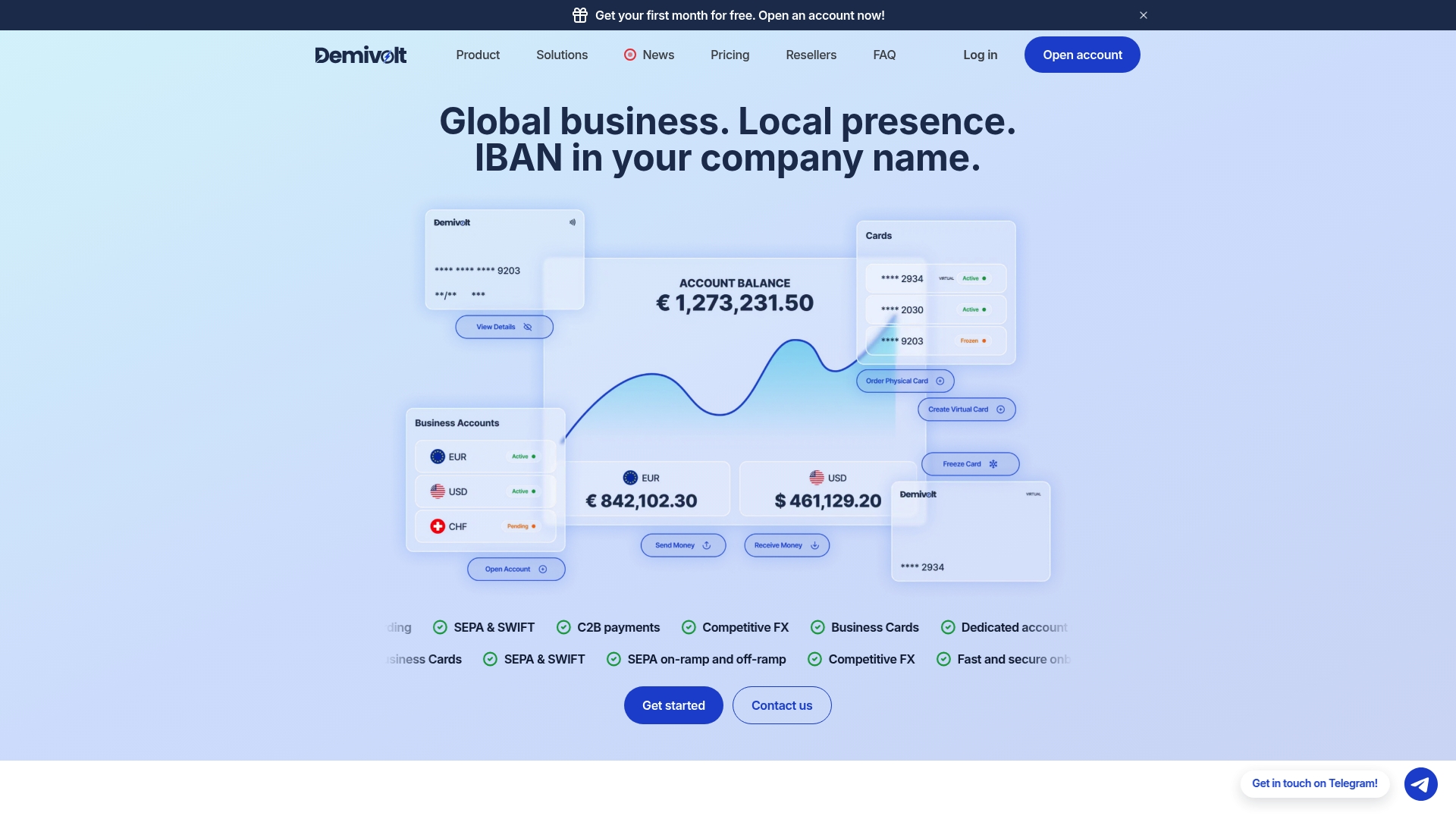
For businesses managing payments, IBAN accounts, and cross-border transactions, access control is not just an IT concern. It is a compliance requirement. Demivolt’s regulated business banking platform includes built-in role-based user management, giving finance teams and administrators precise control over who can initiate payments, approve transactions, or view account data, without the overhead of configuring a separate IAM system for your banking operations.
The platform supports multi-account structures with dedicated IBAN accounts, SEPA and SWIFT payment management, and virtual and physical card issuance, all governed by role-based permissions that align with your internal authorization policies. Onboarding is fast, transparent, and designed to meet EU regulatory standards, with client funds held in segregated accounts for full compliance integrity. For SMEs and cross-border operators who need financial control without complexity, Demivolt provides the regulated infrastructure to match. Validate your IBAN accounts and get started with Demivolt’s free financial tools or explore the full platform at Demivolt.
Key Takeaways
Effective RBAC requires defining roles around job functions, applying least privilege at every layer, and treating role governance as a continuous operational discipline rather than a one-time setup task.
| Point | Details |
|---|---|
| Define roles by function, not title | Roles tied to technical functions stay stable through personnel changes and reduce maintenance overhead. |
| Apply least privilege from day one | Assign minimum permissions upfront and expand only after validated business need is confirmed. |
| Integrate with a central identity provider | Managing roles in a single IdP ensures consistent access across all connected applications and automates lifecycle events. |
| Audit role assignments regularly | Quarterly access certification campaigns catch privilege creep and orphaned access before they become security liabilities. |
| Demivolt embeds RBAC in financial operations | Demivolt’s platform includes role-based user management for payment initiation, approval, and account access across multi-account structures. |