

TL;DR:
- A secure onboarding workflow verifies, provisions, and monitors employee access while enforcing security standards from day one. Implementing identity verification, MFA, RBAC, and automation before employee start date minimizes risks like shadow IT and data breaches. Regular audits and a no-blame culture ensure ongoing compliance and effective threat detection.
A secure onboarding workflow is the systematic process of verifying, provisioning, and monitoring new employees’ access while enforcing security and compliance standards from day one. For SME decision-makers, getting this right is not optional. Regulatory exposure, data breaches, and shadow IT all trace back to weak onboarding. The good news: technical setup completed before the first day reduces delays and errors significantly, and the full security onboarding process, including multi-factor authentication (MFA) with tools like Microsoft Authenticator or Google Authenticator, password manager training, and phishing awareness, can be completed in under 30 minutes. Automation and audit trails make that speed sustainable.
What does a secure onboarding workflow require?
A solid onboarding security foundation starts with identity verification. Background checks and digital identity proofing confirm who you are hiring before any system access is granted. Without this step, every downstream security measure is built on an assumption.
Identity and Access Management tools are the backbone of any compliant onboarding process. The table below maps the core tool categories to their function and leading options:
| Tool Category | Purpose | Examples |
|---|---|---|
| Multi-Factor Authentication | Verify user identity at login | Microsoft Authenticator, Google Authenticator, YubiKey |
| Password Management | Enforce strong, unique credentials | 1Password, Bitwarden, Dashlane |
| Identity Governance and Administration (IGA) | Automate provisioning and access certification | SailPoint, Saviynt |
| Audit and Logging | Record all access events with timestamps | Splunk, Datadog, Azure Monitor |
| Single Sign-On (SSO) | Centralize access control | Okta, Azure AD, Google Workspace |
SMS-based MFA is insecure as of 2026 and should serve only as a fallback. Hardware keys like YubiKey or platform authenticators built into iOS and Android are the required standard for new hires. This matters because SIM-swapping attacks make SMS codes trivially interceptable.
Role-Based Access Control (RBAC) is the policy engine that enforces least privilege. Every new hire receives only the access their role requires, nothing more. Embedding RBAC and audit trails in onboarding prevents patchwork security and compliance failures across HR, IT, and security teams.

Pro Tip: Set up a no-blame phishing reporting channel, such as a dedicated Slack channel or email alias, before your first hire’s start date. Employees who fear punishment for clicking a test phishing link will hide real incidents.
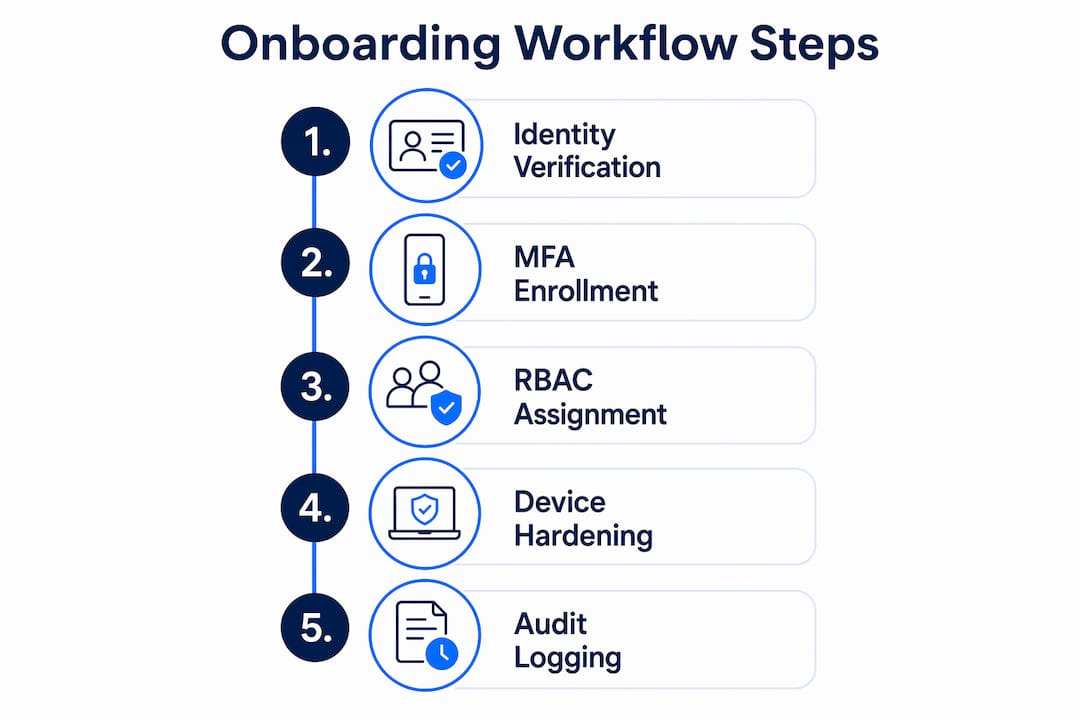
Password policies must specify minimum length, complexity, and rotation schedules. Pair those policies with a password manager so employees never reuse credentials across systems. Automated audit trails that log every access event, change, and export with timestamps are not a nice-to-have. They are your proof of compliance when a regulator or auditor asks.
How do you execute a secure onboarding workflow step by step?
The biggest mistake SMEs make is treating security setup as something new hires handle on their first day. By then, the damage is already possible. Critical steps like account creation, MFA setup, and device hardening must happen before the employee walks in the door.
Here is a structured sequence with estimated timings:
- Day minus 5 (Pre-start): Create accounts in your identity provider (Okta, Azure AD, or Google Workspace). Assign the correct RBAC role. Configure MFA and send enrollment instructions. Estimated time: 20 minutes per hire.
- Day minus 2: Harden the assigned device. Apply endpoint management policies via Microsoft Intune or Jamf. Encrypt the hard drive. Estimated time: 15 minutes.
- Day minus 1: Conduct a live video call walkthrough of MFA enrollment. Live walkthroughs of MFA setup significantly reduce configuration mistakes compared to email instructions alone. That translates directly to fewer IT support tickets on day one.
- Day 1, first hour: Have the new hire sign the IT usage policy and data handling agreement digitally. Use DocuSign or a similar e-signature tool. No paper.
- Week 1, days 2 through 5: Run phishing awareness training. Gamified phishing simulations and a zero-blame culture encourage reporting and reduce security incidents. Tools like KnowBe4 or Proofpoint Security Awareness Training deliver scenario-based modules that take under 20 minutes.
- Week 2: Confirm all access is scoped correctly. Run an access certification review to catch any provisioning errors.
- Ongoing: Automate provisioning and deprovisioning through an IGA platform. Automation through IGA platforms minimizes errors and accelerates compliance across the employee lifecycle.
Pro Tip: Document every exception to the standard workflow in a tracked log. When a new hire needs access outside their default role, route that request through an approved change management process, not a quick Slack message to IT.
Completing these steps before and during the first week prevents shadow IT from forming. When employees cannot get the tools they need through official channels, they use personal Dropbox accounts, personal Gmail, and unapproved apps. That is shadow IT, and it is a compliance and data breach risk that starts on day one if onboarding is slow.
What are the most common pitfalls in secure onboarding?
Most onboarding security failures are not dramatic. They are quiet, repetitive mistakes that compound over time. Knowing them in advance is the fastest way to avoid them.
- SMS MFA reliance: Many SMEs default to SMS codes because they are easy to set up. This is the wrong call. SIM-swapping and SS7 protocol attacks make SMS codes unreliable. Migrate to authenticator apps or hardware keys from the start.
- Swivel-chairing: Manual copying of personally identifiable information between systems creates data exposure risks. When an HR coordinator copies a new hire’s Social Security number from an email into four different systems by hand, each paste is a potential breach point. Automation with enforced logging eliminates this.
- Siloed teams: HR completes paperwork. IT provisions accounts. Security runs training. None of them talk to each other. The result is access granted before background checks clear, or training skipped because IT assumed HR handled it.
- Improvised exceptions: A manager needs a new hire to access a sensitive system immediately. IT grants access outside the standard workflow. No ticket is filed. No audit trail exists. Regulators call this a control failure.
- Weak training culture: If employees fear punishment for reporting a phishing click, they stay silent. Silent employees are the reason breaches go undetected for months.
“Treat onboarding as a high-risk data pipeline touching payroll, identity, and sensitive records. Security needs to be embedded, not treated as an HR task.” Everworker.ai
The fix for most of these pitfalls is the same: a single, documented workflow that HR, IT, and security all follow, with automated handoffs and a shared audit log. Quarterly reviews of that log surface gaps before they become regulatory findings. When you spot a pattern, such as three new hires in one quarter who never completed phishing training, you fix the process, not just the individuals.
How do you maintain compliance in ongoing onboarding processes?
Compliance is not a one-time checkbox. Quarterly internal compliance audits that randomly sample employee files help organizations remediate documentation or access gaps before a regulator finds them. That proactive posture is the difference between a corrective action plan and a fine.
The metrics that matter most for ongoing compliance are:
- Training completion rate: What percentage of new hires finished phishing awareness training within their first two weeks?
- Access review cycle time: How long does it take to certify that all active accounts have the correct permissions?
- Incident response time: When a new hire reports a suspicious email, how quickly does the security team respond?
- Exception rate: How many onboarding workflows required a manual exception, and why?
Encrypted audit trails that record every access, change, and export with timestamps give you the raw data to answer all of these questions. Platforms like Okta, Azure AD, and Google Workspace generate these logs natively. The key is centralizing them in a SIEM tool like Splunk or Microsoft Sentinel so you can query across systems.
Data lifecycle management is the part most SMEs skip. Define retention periods for onboarding documents at the point of collection. GDPR and similar frameworks require you to delete personal data when it is no longer needed. Build deletion schedules into your workflow from the start, not as an afterthought two years later.
Pro Tip: Run a tabletop exercise once per quarter where HR, IT, and security walk through a simulated onboarding breach scenario. This surfaces process gaps faster than any audit.
For SMEs operating across borders, compliant onboarding methods for cross-border B2B environments require additional layers, including jurisdiction-specific data residency rules and payment verification standards. Integrating your identity provider with your financial infrastructure is where many SMEs find the most friction, and the most risk.
Key takeaways
A secure onboarding workflow requires identity verification, RBAC, phishing-resistant MFA, and automated audit trails working together before a new hire’s first day.
| Point | Details |
|---|---|
| Complete setup before day one | Account creation, MFA enrollment, and device hardening must finish before the start date to prevent shadow IT. |
| Replace SMS MFA immediately | Use hardware keys or platform authenticators; SMS codes are vulnerable to SIM-swapping attacks. |
| Automate to eliminate swivel-chairing | Manual data copying between systems is the primary source of PII exposure; IGA platforms remove this risk. |
| Run quarterly compliance audits | Randomly sample employee files every quarter to catch documentation and access gaps before regulators do. |
| Build a no-blame reporting culture | Employees who feel safe reporting mistakes detect threats faster and reduce breach dwell time. |
Why most smes get secure onboarding wrong
The honest truth is that most SMEs treat onboarding security as a checklist item rather than a process design problem. I have seen this pattern repeatedly: a company invests in good tools, writes a solid policy, and then watches it fall apart because HR, IT, and security each own a piece of the workflow with no shared handoff protocol.
The counterintuitive insight is that speed and security are not in conflict. When you complete MFA setup, device hardening, and access provisioning before day one, the new hire’s first day is actually faster and less frustrating. The friction is front-loaded into the pre-start period, where it belongs, not dumped on the employee during their first hours on the job.
Culture is the variable that tools cannot fix. A no-blame security environment, where reporting a phishing click is treated as a contribution rather than a failure, is worth more than any endpoint detection platform. The security-first onboarding approach that actually works combines fast technical setup with a human culture that makes security feel like a shared responsibility, not a surveillance system.
Automation is not a luxury for SMEs. It is the only way to maintain compliance at scale without a dedicated compliance team. IGA platforms, automated audit trails, and integrated identity providers remove the human error that makes manual processes unreliable. Start with the tools you already have, such as Azure AD or Google Workspace, and build from there.
— dd
How Demivolt supports your onboarding security
Demivolt is built for SMEs that cannot afford compliance gaps in their financial workflows. Its platform connects directly to the onboarding process by providing verified IBAN accounts, role-based user management, and automated audit trails that meet EU regulatory standards.
When your onboarding workflow touches payment accounts and cross-border transactions, accuracy at the data entry stage is critical. Demivolt’s free IBAN validation tool catches account number errors before they become payment failures or compliance flags. For SMEs building a compliant digital banking onboarding process, Demivolt provides the financial infrastructure that keeps your records clean, your payments accurate, and your auditors satisfied.
FAQ
What is a secure onboarding workflow?
A secure onboarding workflow is the structured process of verifying new employees’ identities, provisioning access based on their role, and enforcing security policies from before their start date. It combines identity verification, MFA, RBAC, and audit logging into a single documented process.
Why is SMS MFA a risk in employee onboarding?
SMS-based MFA is vulnerable to SIM-swapping and SS7 protocol attacks, making it unreliable as a primary authentication method. Hardware keys like YubiKey or platform authenticators in Microsoft Authenticator and Google Authenticator are the current standard.
How often should onboarding compliance audits run?
Quarterly internal audits that randomly sample employee files are the recommended frequency. This cadence catches documentation gaps and access errors before they become regulatory findings.
What is swivel-chairing and why does it matter?
Swivel-chairing is the practice of manually copying sensitive data between systems by hand. It creates data exposure risk at every paste point and is the primary source of PII breaches in manual onboarding workflows. Automation with enforced logging eliminates it.
How does RBAC improve onboarding security?
Role-Based Access Control limits each new hire to only the system access their job requires. This least-privilege approach prevents over-provisioning and reduces the blast radius if an account is compromised during or after onboarding.