

TL;DR:
- Most small business owners lose money due to poor record-keeping rather than bad decisions.
- Implementing a structured expense tracking system helps ensure accurate records, IRS compliance, and audit readiness.
Most small business owners don’t lose money to bad decisions. They lose it to bad records. Following clear business expenses tracking steps is the difference between a tax season that takes hours and one that takes weeks of painful reconstruction. Whether you’re running a five-person agency or managing finances across multiple entities, a structured system for tracking business expenses catches deduction opportunities, keeps you audit-ready, and gives you actual visibility into where your money goes.
Table of Contents
- Key takeaways
- Setting up your business expense tracking system
- Step-by-step execution of tracking business expenses
- Verification and review: maintaining accuracy and compliance
- Common challenges and practical solutions
- My honest take on expense tracking
- How Demivolt fits into your expense tracking setup
- FAQ
Key takeaways
| Point | Details |
|---|---|
| Separate finances first | Open a dedicated business account before building any tracking system. |
| Capture receipts immediately | Document expenses at the point of purchase to avoid gaps in your records. |
| Reconcile monthly | Match bank statements to your records within the first week after month-end. |
| Use IRS-compliant digital records | Scanned receipts must meet legibility, indexing, and retrieval requirements to count. |
| Automate where possible | Bank feeds and automated categorization cut manual errors as transaction volume grows. |
Setting up your business expense tracking system
Before you track a single dollar, you need the right infrastructure in place. Skipping this step is the most common reason tracking systems fall apart within months.
Separate business and personal finances
This is non-negotiable. Mixing personal and business expenses doesn’t just create accounting headaches. It creates legal and tax exposure. Open a dedicated business checking account and, if you put business charges on a card, use a card issued specifically for business spending. When every transaction on your business account is a business transaction, your records are automatically cleaner. You can learn more about structuring this with a multi-account approach designed specifically for SMEs.
Choose the right tracking tool for your size
Your tool choice should match your current volume and where you expect to be in two years. Here’s a quick comparison:
| Tool type | Best for | Key limitation |
|---|---|---|
| Spreadsheet | Solopreneurs, very low volume | Manual entry errors, no automation |
| Dedicated expense app | Growing SMEs, receipt capture | May require separate accounting sync |
| Accounting software | Established businesses, full reporting | Higher cost, learning curve |
| Business banking platform | Teams needing card control + visibility | Best paired with accounting software |
The most important quality in any tool isn’t features. It’s consistency. A system you actually use daily beats a feature-rich tool you open monthly.
Build a categorization structure that matches your taxes
Your expense categories should mirror how your accountant or your tax software reports deductions. Common categories include office supplies, software subscriptions, travel, meals, professional services, and payroll. Set these up once, document them, and make sure anyone on your team who submits expenses understands them.
Consistent tracking categories separate businesses that always know their numbers from those that scramble at year-end. According to that guide, the common workflow for small businesses spends about five minutes weekly and fifteen minutes monthly on reconciliation when the foundation is solid.
Pro Tip: When selecting a tool, ask whether it will still serve you at three times your current transaction volume. Migrating systems mid-year is expensive and disruptive.
Step-by-step execution of tracking business expenses
Once your system is built, execution is about discipline and timing. These steps for expense tracking give you a repeatable workflow that works whether you’re processing ten transactions a week or two hundred.
-
Capture receipts at the point of purchase. The moment a transaction happens is when documentation is easiest. Use your phone to photograph paper receipts immediately. Most modern expense apps let you upload directly from your camera roll and attach the image to the transaction automatically.
-
Link receipts to transactions in your accounting system. A receipt sitting in your email is not a documented expense. It needs to be attached to the specific transaction it covers. This is what creates an audit trail rather than just a pile of records.
-
Enable bank feeds and automatic transaction imports. Automating transaction imports from your bank and card accounts eliminates the biggest source of missed entries. When transactions appear automatically, you’re reviewing and categorizing rather than manually entering, which is faster and more accurate.
-
Categorize every expense and document the business purpose. For meals and entertainment especially, the IRS requires more than just a receipt. You need to record the business purpose, attendees, and itemized amounts to keep those deductions valid. Make this a habit, not an afterthought.
-
Route expenses through an approval workflow if you have a team. If you have employees or contractors submitting expenses, use a structured approval process. Approval workflows route expenses through designated approvers, with escalation timers that kick in if an approver delays beyond a set window, typically three days. This prevents expenses from stalling and keeps your books current.
-
Post approved expenses promptly. An important but often overlooked detail: in some accounting systems, unapproved expenses remain unposted, meaning they don’t appear on your financial statements until approval is complete. Know how your system handles this boundary so your reports reflect reality.
Pro Tip: Set a standing five-minute calendar block every Monday to review the previous week’s transactions. Catching misclassified expenses weekly is far easier than untangling three months at once.
Verification and review: maintaining accuracy and compliance
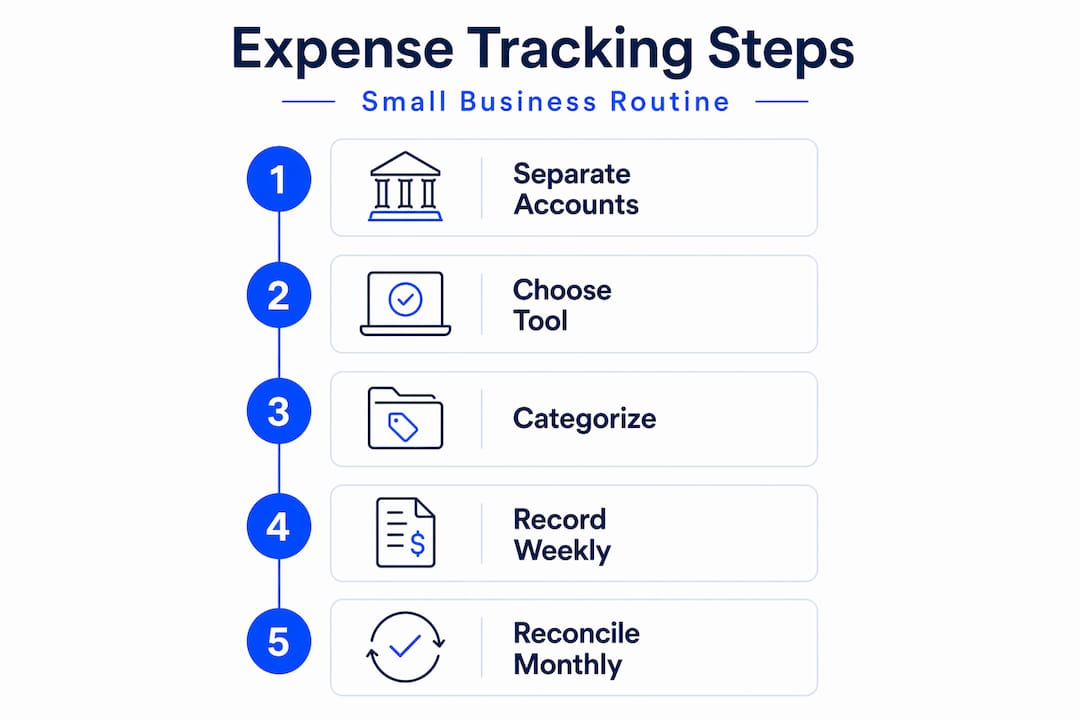
Executing your tracking process is only half the job. Regular review is what keeps the data trustworthy and your business compliant.

Weekly review tasks
Each week, scan new transactions for anything that looks wrong. Fix misclassified expenses before they compound. Upload any receipts you missed during the week. This weekly review routine takes about five minutes when you’re current and much longer when you’re not.
Monthly reconciliation
Reconciliation means matching every transaction in your accounting records to your bank and credit card statements. Monthly reconciliation completed in the first week after month-end catches errors and early signs of fraud, and typically takes thirty to sixty minutes once your system is running well. Look specifically for duplicate charges, personal expenses that slipped through, and any transactions without receipts.
| Task | Frequency | Time estimate |
|---|---|---|
| Categorize new transactions | Daily or weekly | 5 minutes per session |
| Upload missing receipts | Weekly | 5 minutes |
| Review and fix misclassifications | Weekly | 5 minutes |
| Full bank reconciliation | Monthly (within first week) | 30 to 60 minutes |
| Document retention audit | Quarterly | 30 minutes |
IRS-compliant digital records
Scanning receipts is not enough on its own. The IRS, under Rev. Proc. 97-22, sets specific requirements for electronic records: they must be legible, indexed, secured against tampering, and retrievable on request. Storing receipts in a randomly named folder on your desktop does not satisfy those requirements.
The real compliance risk is not about whether you have a receipt. It’s whether your system maintains an audit trail and retrieval capability that holds up under examination. Use dedicated receipt management tools or accounting software with proper folder structures, consistent naming conventions, and search functionality.
Pro Tip: Organize digital receipts by year, then month, then category. Combined with a good search tool, this structure lets you pull any record in under two minutes during an audit.
Common challenges and practical solutions
Even well-designed tracking systems hit friction. Here are the issues that derail most businesses and how to handle them:
-
Missing receipts. The most common problem. If you genuinely cannot locate a receipt, document what you can: the vendor name, the amount, the date, and the business purpose. Some expense tools let you generate a missing receipt affidavit. Prevention is better: photograph receipts before you put them in your wallet.
-
Categorization errors. These happen most when multiple people submit expenses. The fix is a written categorization guide your whole team can reference, not just a list of category names but examples of what belongs in each one. One page, shared and updated annually.
-
Mixed personal and business charges. If a personal expense lands on a business card, record it immediately as an owner draw or personal expense and flag it for correction. Ignoring it creates reconciliation problems and potential tax exposure. A strong internal control workflow with submission, capture, approval, and categorization steps is what prevents these from slipping through repeatedly.
-
Transitioning from manual to automated systems. The most painful migrations happen when businesses try to bring years of inconsistent spreadsheet data into new software. Start the new system clean from a clear date and keep the old records accessible for reference. Parallel systems for thirty days helps you verify the new setup before committing fully.
Trying to fix broken expense records retroactively costs far more time than building a clean system from the start. The best moment to fix your process was last year. The second best is today.
Organizing digital records with logical structures and dedicated management tools transforms your audit response from a scramble into a simple search.
My honest take on expense tracking
I’ve watched businesses invest in premium accounting software and still produce unreliable financial reports. The problem is almost never the tool. It’s the absence of a consistent workflow that every person in the process actually follows.
The step that most guides gloss over is internal controls. Enforcing a consistent submission, approval, and categorization sequence isn’t bureaucracy. It’s what prevents billing inaccuracies and reconciliation problems from piling up silently. When someone skips the approval step because it’s inconvenient, you get unposted expenses, inaccurate statements, and a reconciliation burden that falls on someone else later.
The other thing I think gets underestimated is the gap between “we scan receipts” and “we maintain IRS-compliant records.” Most small businesses assume scanning is enough. It isn’t. Indexing, retrievability, and security matter just as much as having the image. I’ve seen businesses get tripped up in audits not because they lacked documentation, but because they couldn’t retrieve it systematically.
My honest recommendation: keep your process as simple as possible while meeting the compliance minimum. Automation handles the volume problem. Discipline handles the consistency problem. Those two things together make everything else manageable.
— dd
How Demivolt fits into your expense tracking setup
Building a solid expense tracking system starts with the right banking infrastructure. Demivolt gives small businesses dedicated IBAN accounts, virtual and physical business cards, and the ability to manage multiple accounts with role-based access. When every business card transaction flows through a single, purpose-built platform, your bank feeds stay clean, your categorization stays consistent, and your team isn’t mixing personal and business spending.
Demivolt’s support for automating business payments and issuing business cards for your team directly supports the execution steps covered in this guide. Combined with accounting software that pulls your transaction data automatically, it removes the manual entry layer that causes most tracking errors. If you’re ready to build financial infrastructure that actually supports your expense management goals, explore Demivolt’s business banking solutions and see how they fit your current setup.
FAQ
What are the first business expenses tracking steps to take?
Start by separating business and personal finances with a dedicated business account. Then set up a categorization system and choose a tracking tool before you capture a single expense.
How often should I reconcile my business expense records?
Reconcile monthly, ideally within the first week after month-end. Most businesses find the process takes thirty to sixty minutes once their records are current.
Does the IRS accept digital receipts?
Yes, the IRS accepts digital receipts under Rev. Proc. 97-22, but the storage system must maintain legibility, proper indexing, security, and the ability to reproduce records on request.
What is the best way to track business costs without accounting software?
A well-structured spreadsheet paired with a dedicated receipt capture app works for low-volume businesses. As transaction volume grows, the manual process becomes error-prone, and accounting software or a business banking platform becomes worth the investment.
How do I handle a missing receipt for a business expense?
Document everything you can: the vendor, amount, date, and business purpose. Some expense management tools provide a missing receipt declaration form. Preventing gaps by photographing receipts immediately is far more reliable than reconstructing them later.
Recommended
- Demivolt | Blog – How to issue business cards for SMEs: a step-by-step guide
- Demivolt | Blog – How to automate business payments and stay compliant
- Demivolt | Blog – Business account benefits for European SMEs in 2026
- Demivolt | Blog – Business account verification: compliance and efficiency for SMEs