

SEPA direct debit (SDD) is the scheme that lets a biller pull euros straight from a payer’s account, but only once a signed mandate authorizes it. There are two versions: SDD Core for consumer collections, with strong refund rights, and SDD B2B for business-to-business debits, where refund rights are far more limited and your bank must verify the mandate before the money moves. Before you accept or issue a single SEPA direct debit, check three things:
- Confirm which scheme applies (Core or B2B) and its refund window
- Verify pre-notification timing so payers see debits coming
- Read your payment service provider’s (PSP) refund and dispute policy in full
Key Takeaways
SEPA direct debit works only when the mandate, the scheme choice, and the refund window all match the transaction type, and mismatches there are what drive most rejected collections.
| Point | Details |
|---|---|
| Scheme choice sets refund risk | SDD Core gives payers an 8-week no-questions refund; SDD B2B limits refunds to unauthorized collections only. |
| Mandate data must match exactly | UMR and Creditor Identifier mismatches are a leading cause of returned collections and reconciliation errors. |
| ISO 20022 testing prevents delays | Untested message conversions under the 2019 XML standard can silently drop optional fields and trigger R-transactions. |
| Fees vary by scheme, not a blended rate | Ask PSPs for per-scheme pricing since Core, B2B, and SCT Inst often carry different unit costs. |
| Demivolt supports SEPA readiness | Demivolt offers regulated IBAN accounts plus a free IBAN Validator and SEPA Fee Calculator to test data and costs before collections go live. |
Table of Contents
- Understanding Mokėjimų Nuskaitymai SEPA and the Core SEPA Schemes
- How SEPA Direct Debits Actually Work: Mandates and the 4-Corner Model
- SDD Core vs SDD B2B: The Rules That Change Your Risk Exposure
- Processing Timelines and What R-Transactions Mean for Your Books
- Who Pays SEPA Fees, and What to Check in Your PSP Contract
- ISO 20022 Migration: What Finance Teams Need to Do Now
- Who Bears the Risk When a Direct Debit Goes Wrong
- Your SDD Readiness Checklist: Payer and Biller Actions
- Practical Publisher Resources: Demivolt’s SEPA Capabilities and Tools
- Payment Initiation and Reconciliation: How SEPA Payment Scanning Fits the Workflow
- Common Technical Challenges in SEPA Payment Data Extraction
- Security and Compliance When Processing SEPA Payment Scans
- Automating Payment Data Capture: Integration With Accounting and ERP Systems
- How Businesses Use SEPA Payment Scanning in Practice
- SEPA Payment Scanning vs Other Data Capture Methods
- When Direct Debit Is the Right Rail, and When It Isn’t
- Get Started With Demivolt’s Regulated SEPA Infrastructure
- Frequently Asked Questions
- Sources
Understanding Mokėjimų Nuskaitymai SEPA and the Core SEPA Schemes
SEPA covers 36 countries and standardizes euro payments under rules set by the European Payments Council (EPC). Four schemes matter for most businesses:
- SCT (SEPA Credit Transfer): standard push payments, settled within one business day
- SCT Inst: instant transfers, settled in seconds, available around the clock
- SDD Core: direct debit for consumer billing, with an 8-week no-questions refund window
- SDD B2B: direct debit for corporate collections, with tighter mandate checks and minimal refund rights
Mixing these up creates real problems. A biller who treats a B2B mandate like a Core mandate risks a rejected collection, because the payer’s bank checks B2B mandates against its records before releasing funds.
How SEPA Direct Debits Actually Work: Mandates and the 4-Corner Model
Every SEPA direct debit runs on a mandate, the payer’s written or electronic authorization for a specific biller to collect specific amounts. Two identifiers make the system auditable: the Unique Mandate Reference (UMR) and the biller’s Creditor Identifier, both of which travel with every collection message. Mismatched UMRs are a leading cause of returned collections, which is why PSPs cross-check these fields at onboarding.
The process follows a 4-corner structure:
- The payer signs a mandate (paper or e-mandate) authorizing the biller
- The biller stores the mandate and submits collection instructions to its PSP
- The biller’s PSP routes the file through a clearing and settlement mechanism (CSM) to the payer’s PSP
- The payer’s PSP debits the account and the payer sees the transaction, backed by the pre-notification they received earlier
Mandates can cover a single collection or a recurring series, and storage rules require keeping records for at least 14 months after the last collection.
Pro Tip: Store mandates digitally from day one, even paper-signed ones. A scanned, timestamped copy tied to the UMR saves hours when a payer’s bank requests proof during a dispute.
SDD Core vs SDD B2B: The Rules That Change Your Risk Exposure
The scheme you choose determines who can push back on a collection and for how long. SDD Core exists for consumer billing precisely because consumers need an easy exit: they can request a refund within 8 weeks with no reason given, and up to 13 months if the collection was unauthorized entirely. SDD B2B strips most of that flexibility because businesses are expected to manage their own cash flow controls.
- SDD Core: no mandate verification required by the payer’s bank; 8-week refund window for authorized-but-disputed debits
- SDD B2B: payer’s bank must verify the mandate before settlement; refund rights apply only to unauthorized transactions, not simple disputes
- Use case fit: subscriptions, utilities, and membership billing suit Core; supplier payments and intercompany settlements suit B2B
That 8-week no-questions window is the single biggest reason SDD Core dominates recurring consumer billing across the EU. It gives payers a safety net that B2B collections deliberately don’t offer, which shifts more diligence onto the biller before a B2B mandate ever gets signed.
Processing Timelines and What R-Transactions Mean for Your Books
Submission lead times differ depending on whether a collection is a first-time debit or a recurring one. First-time and one-off collections generally require longer advance notice to the payer’s PSP than subsequent collections in a recurring series, a distinction your PSP’s onboarding documentation should spell out clearly.
When something goes wrong, it shows up as an R-transaction, shorthand for rejects, refusals, returns, refunds, and reversals. Each carries a reason code:
- Reject: caught before processing, often due to an invalid IBAN or missing mandate data
- Return: failed after submission, commonly from insufficient funds or a closed account
- Refund: payer-initiated, using their scheme-specific refund right
- Reversal: biller-initiated correction, typically for a data entry error
ISO 20022 conversion issues add another failure point. When legacy message formats get converted to the 2019 ISO 20022 XML standard without proper testing, optional fields can get dropped or mismatched, triggering returns that have nothing to do with the payer’s account status.
Who Pays SEPA Fees, and What to Check in Your PSP Contract
Fee responsibility usually splits along predictable lines. The biller typically pays the processing fee for initiating SDD collections, since they’re the party benefiting from automated recurring revenue. For SCT Inst, either party can bear the cost depending on the PSP’s pricing model, though billers often absorb it to keep the payer experience frictionless.
Pricing shapes vary:
- Per-transaction fees, sometimes fractions of a cent at volume through infrastructure like CENTROlink
- Tiered volume pricing, where the per-collection cost may decrease as monthly volume rises.
- Flat monthly account fees layered on top of transaction costs
Pro Tip: Ask your PSP for the fee schedule broken out by scheme, not a single blended rate. Core, B2B, SCT, and SCT Inst often carry different unit costs, and a blended quote can hide which rail is actually expensive for your volume.
Compare contracts against a simple checklist: transaction fee per scheme, minimum monthly commitment, return/reject fees, and whether pricing steps down at defined volume thresholds.
ISO 20022 Migration: What Finance Teams Need to Do Now
ISO 20022 is the international XML messaging standard maintained by ISO Technical Committee TC68, and it underpins every SEPA message format. It matters because consistent, structured XML fields make straight-through processing (STP) possible, meaning fewer manual touches between initiation and settlement.
Migration risk shows up mainly as data conversion problems. Where PSPs convert older message formats to the 2019 version without full testing, subtle data loss or field mismatches can trigger reconciliation issues that look like account problems but are actually formatting errors. The 2025 SDD Core Rulebook entered into force ahead of its originally planned schedule, leaving PSPs a compressed window to implement changes.
Before your next batch of collections, run this checklist:
- Test sample files against the current ISO 20022 message version with your PSP
- Confirm optional fields your accounting system relies on survive the conversion
- Ask your PSP directly whether they’ve completed 2025 rulebook implementation
- Validate the SEPA Core subset fields, especially IBAN formatting, before go-live
Who Bears the Risk When a Direct Debit Goes Wrong
The biller’s PSP, not the payer, carries the primary financial risk for fraudulent or erroneous collections. That’s exactly why PSPs vet new billers carefully before granting SDD collection rights, since they’re the ones exposed if a mandate turns out to be invalid or forged.
If you need a refund or believe a collection was unauthorized, follow these steps:
- Contact your bank within the applicable window: 8 weeks for authorized-but-disputed Core debits, up to 13 months for unauthorized ones
- Provide the collection reference and UMR tied to the disputed transaction
- Note whether you received a pre-notification, since its absence supports an unauthorized-collection claim
- Follow up in writing if the refund doesn’t post within your bank’s stated processing time
Pro Tip: Keep pre-notification emails or letters for at least a year. They’re the fastest evidence when you need to prove a collection came as a surprise.
Your SDD Readiness Checklist: Payer and Biller Actions
Get these in order before your next collection cycle:
If you’re a payer:
- Set up account alerts for incoming direct debit pre-notifications
- Whitelist known billers with your bank to avoid accidental blocks
- Know your refund window before disputing a charge
If you’re a biller:
- Obtain a Creditor Identifier from your national authority before your first collection
- Draft mandate language that clearly states amount, frequency, and biller identity
- Store every mandate with its UMR for at least 14 months past the last collection
- Run test collections through your PSP’s sandbox before going live
Pro Tip: Reconcile test collections against your accounting software before processing real ones. A mismatch between what your ERP expects and what the ISO 20022 message actually delivers is far cheaper to fix in testing than after a live batch fails.
Practical Publisher Resources: Demivolt’s SEPA Capabilities and Tools
Demivolt is a regulated European fintech offering dedicated IBAN accounts and SEPA payment handling built for SME and cross-border operations. Two tools help before you commit to a PSP:
- The SEPA Fee Calculator estimates per-scheme costs so you can compare pricing shapes before signing
- The IBAN Validator checks account data against ISO 13616 formatting, catching errors before they cause rejected collections
Both support the testing and validation work ISO 20022 readiness demands.
Payment Initiation and Reconciliation: How SEPA Payment Scanning Fits the Workflow
Payment scanning, extracting structured data from remittance advice, invoices, or bank statements, sits at the initiation and reconciliation ends of the SEPA direct debit cycle. On initiation, scanning tools read invoice data (amount, payer IBAN, reference number) and generate the ISO 20022 pain.008 message that instructs the collection, reducing manual entry errors that would otherwise show up as rejects.
Reconciliation is where scanning earns its keep. Once a bank statement (camt.053 format) arrives showing settled collections, returns, and refunds, matching each line against the original invoice and mandate reference by hand is slow and error-prone at any real volume. Automated extraction pulls the UMR, amount, and reason code from each statement line and matches it against open receivables in your accounting system.
The practical sequence looks like this:
- Invoice or billing data gets captured and validated (IBAN format, amount, reference)
- The collection instruction is generated and submitted through the biller’s PSP
- Settlement data returns via camt.053 or camt.054 messages
- Scanning software matches settled lines against outstanding invoices, flagging unmatched items
- Unmatched or exception lines (returns, R-transactions) route to a manual review queue
The value shows up most clearly at scale. A business processing a few dozen collections a month can reconcile manually without much pain. One processing thousands runs into matching errors that compound, especially when reference numbers get truncated or reformatted somewhere in the message chain.
Common Technical Challenges in SEPA Payment Data Extraction
Data extraction from SEPA-related documents fails in predictable ways, and most failures trace back to formatting inconsistency rather than the extraction technology itself.
Reference number truncation is the most common issue. Some legacy banking systems truncate the remittance reference field, cutting off the characters that link a payment to its invoice. When that happens, automated matching fails and the transaction lands in a manual review queue even though the payment itself settled correctly.
Character encoding problems show up specifically where non-Latin characters appear in payer or biller names. Lietuvos bankas has documented specific arrangements to support Lithuanian characters within SEPA payment text fields, which matters because inconsistent encoding across PSPs can corrupt names during message conversion, breaking automated name matching.
Format drift between message versions causes another category of error. A field that was optional under one ISO 20022 message version might be mandatory or repositioned under another, and extraction logic built for the older format silently misreads or drops that field after a scheme update.
Multi-currency or multi-format statement handling trips up extraction when a business receives both camt.053 statements and legacy MT940 files from different banking relationships, each structuring the same underlying data differently.
The fix in each case is the same: validate extracted fields against a known schema (the SEPA Core subset for initiation messages) before they hit your accounting system, and route anything that fails validation to manual review rather than letting a malformed field post silently.
Security and Compliance When Processing SEPA Payment Scans
Scanned or extracted SEPA payment data carries the same sensitivity as the underlying bank account and personal data it represents, which means it falls under the EU’s data protection framework alongside PSD2’s security requirements for payment services.
Three compliance areas deserve direct attention. First, data minimization: extraction workflows should capture only the fields needed for reconciliation and collection processing, not full statement images retained indefinitely without a defined retention policy. Second, access control: anyone who can view extracted payment data, including IBANs and payer names, should be limited by role, since this data is exactly what’s needed to attempt a fraudulent collection if it leaks. Third, audit trail integrity: every extracted record should retain a link back to its source document, so a disputed transaction can be traced to the original message rather than just the extracted values.
Regulated PSPs, including Demivolt, operate under supervisory frameworks that require safeguarding client funds through segregated accounts and maintaining compliant onboarding checks. Businesses building or buying scanning tools should confirm the vendor’s data handling meets equivalent standards, particularly around where extracted data is stored and for how long.
Encryption in transit and at rest is the baseline expectation for any tool touching IBAN or mandate data. Beyond that, look for vendors who can document their own compliance posture rather than simply asserting it, since payment data breaches carry both regulatory and reputational cost that outlasts the immediate financial loss.
Automating Payment Data Capture: Integration With Accounting and ERP Systems
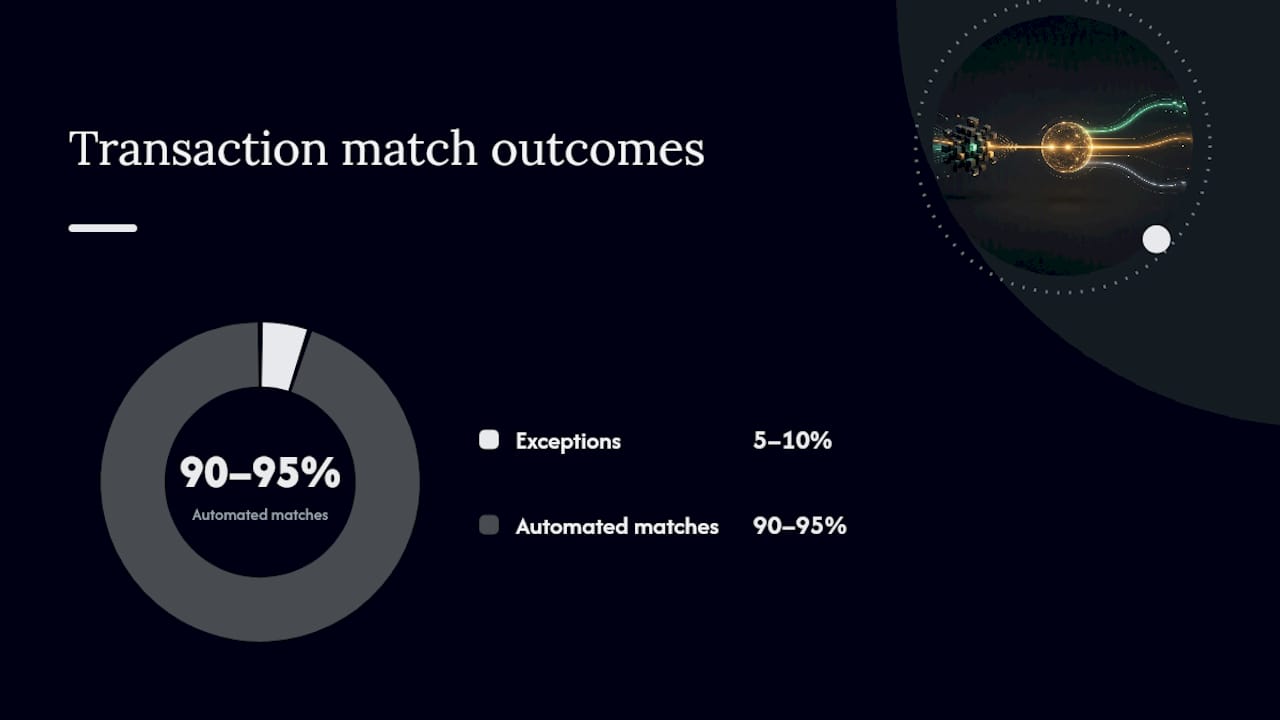
The gap between scanning payment data and actually using it shows up at the integration layer. Extracted fields are only useful once they land correctly in the accounting or ERP system that runs your books, and that handoff is where most automation projects stall.
A few practices consistently separate smooth integrations from painful ones:
- Map fields before building, not after. Confirm exactly which ISO 20022 fields (UMR, end-to-end ID, remittance reference) correspond to which fields in your ERP’s payment matching logic before writing any integration code.
- Build for exceptions, not just the happy path. The majority of integration failures happen on the 5 to 10 percent of transactions with missing or malformed data, not the clean majority. Design the exception queue with as much care as the automated matching logic.
- Reconcile at the statement level, not the transaction level, when volume is high. Matching against camt.053 batch statements rather than individual transaction confirmations reduces the number of API calls and matching operations your system needs to run.
- Keep a manual override path. Even a well-built automated match needs a way for someone in accounting to correct a mismatched entry without editing the underlying extracted data.
- Test against your PSP’s actual message format, not a generic ISO 20022 sample. PSPs implement optional fields differently, and a mapping built against a generic template can fail against your specific PSP’s live messages.
Integration timelines vary by how many banking relationships and message formats a business needs to support simultaneously. A business with a single PSP and a single message format can typically automate reconciliation faster than one juggling multiple banking relationships, each with slightly different field conventions.
How Businesses Use SEPA Payment Scanning in Practice
Subscription and membership businesses use payment scanning primarily on the reconciliation side, matching thousands of small recurring SDD Core collections against subscriber accounts without a finance team manually checking each line. Given the volume of small-value recurring collections in this category, even a small unmatched-transaction rate translates into meaningful manual review hours each month.
Wholesale and B2B suppliers lean more heavily on the initiation side. A supplier collecting from dozens of corporate customers under SDD B2B mandates needs accurate Creditor Identifier and UMR data on every collection, since B2B mandate verification means an incorrect reference is more likely to bounce than in the more permissive Core scheme. Scanning invoice and purchase-order data directly into the collection instruction reduces that risk.
Property management and utility billing operations sit somewhere between the two, running Core collections against large tenant or customer bases with predictable recurring amounts, where the main value of scanning is catching mandate mismatches before submission rather than fixing problems after the fact.
Cross-border e-commerce businesses collecting from customers across multiple SEPA countries face the added complexity of reconciling statements that may arrive in different formats depending on the customer’s bank and country, making format-agnostic extraction more valuable than for a purely domestic biller.
In each case, the underlying pattern holds: scanning earns its value at volume, and the specific pain point it solves (initiation errors, reconciliation lag, format inconsistency) depends on the transaction mix.
SEPA Payment Scanning vs Other Data Capture Methods
Payment scanning is one of several ways to get transaction data into a usable digital format, and it sits alongside rather than replaces some of the alternatives.
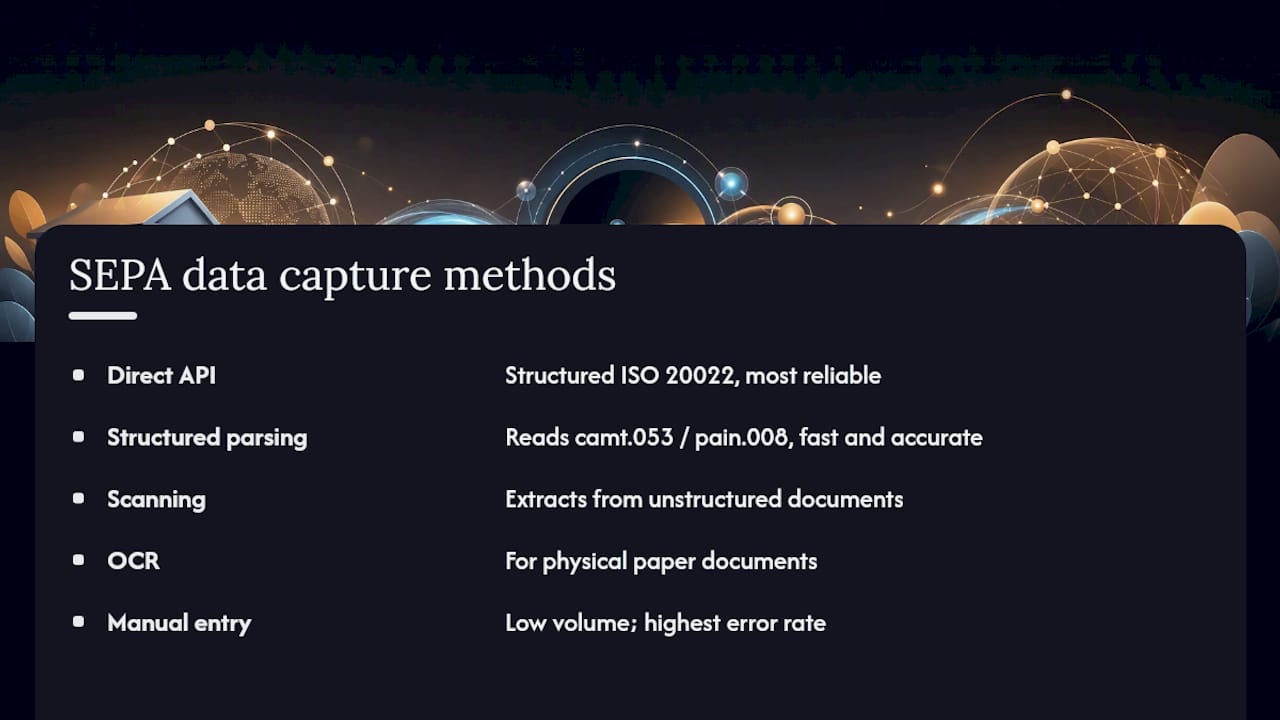
Direct API integration with your PSP is the most reliable method when available, since it delivers structured ISO 20022 data directly without any extraction step. Scanning becomes necessary specifically when a data source, an incoming invoice, a legacy statement format, a paper mandate, doesn’t arrive through a structured API in the first place.
Manual data entry remains common at low volume and carries the highest error rate of any method, since human transcription of IBANs and reference numbers introduces the exact transposition errors that automated matching is built to catch.
Optical character recognition (OCR) on paper documents overlaps with scanning but applies to a narrower case: physical mandates or paper remittance advice that never existed in digital form. Structured file parsing (reading camt.053 or pain.008 XML directly) is faster and more accurate than OCR whenever the source document already exists as a structured file, since there’s no image-to-text conversion step to introduce errors.
Bank statement aggregation services pull data from multiple banking relationships into one feed, which solves a different problem than scanning: consolidation across accounts, rather than extraction from unstructured documents. A business often needs both: aggregation to see all its accounts in one place, and scanning or parsing to turn each account’s statements into matched, reconciled entries.
The methods interact rather than compete. A mature reconciliation workflow typically uses direct API or structured file parsing wherever a structured feed exists, and reserves scanning or OCR for the narrower set of documents that never had structured origins to begin with.
When Direct Debit Is the Right Rail, and When It Isn’t
SDD Core makes sense the moment you’re billing recurring amounts to individual consumers who expect predictability, subscriptions, memberships, utilities. Its refund window is generous by design, and that generosity is what makes consumers comfortable authorizing it in the first place. SDD B2B fits corporate-to-corporate collections where both parties have already negotiated payment terms and neither expects a no-questions refund option.
The trade-off worth weighing before you commit: Core’s payer-friendly refund rights mean better customer experience but real refund exposure for the biller, while B2B’s tighter mandate checks reduce fraud risk but demand more upfront diligence from your finance team. If your reconciliation process can’t yet handle exception volume cleanly, that’s a stronger argument for starting with a smaller collection base than for avoiding direct debit altogether.
Get Started With Demivolt’s Regulated SEPA Infrastructure
Running SEPA collections without a validated IBAN and a clear fee structure is how businesses end up chasing rejected transactions instead of collecting revenue on schedule. Demivolt gives you a dedicated IBAN account built for SEPA and SWIFT processing, with multi-account structures and role-based access so your finance team controls exactly who can initiate or approve a collection.
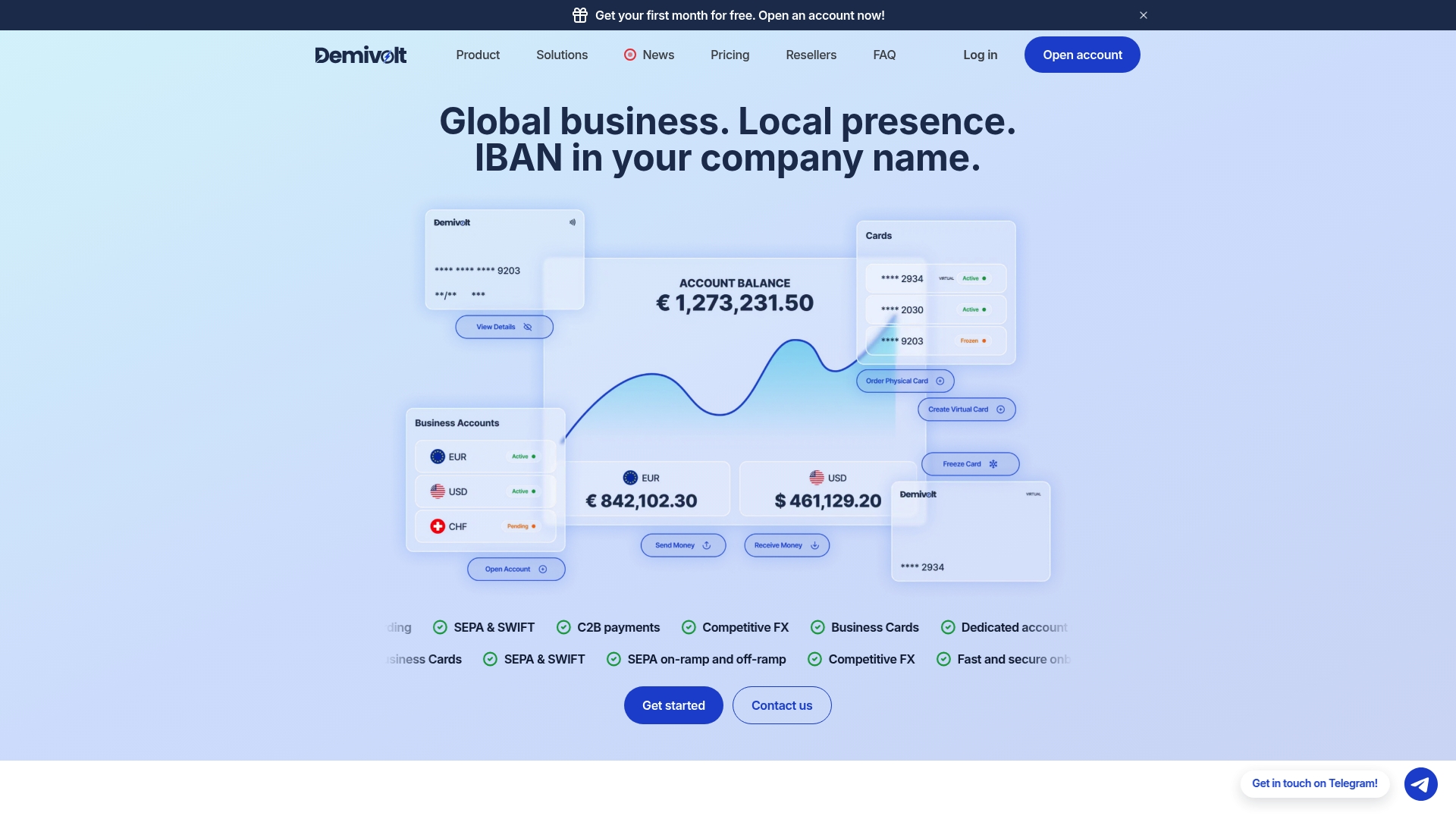
Before you submit your next batch of SDD collections, run your account data through the IBAN Validator to catch formatting errors before your PSP does, and use the SEPA Fee Calculator to compare what you’d actually pay per scheme. If the numbers make sense, start onboarding with Demivolt and get a regulated account structured for cross-border euro collections from day one.
Frequently Asked Questions
What does “mokėjimų nuskaitymai SEPA” mean in practice? It refers to SEPA payment debits or collections, most commonly SEPA direct debit (SDD), where a biller withdraws funds from a payer’s account under a signed mandate rather than the payer pushing the payment themselves.
How long does a SEPA direct debit refund take? Under SDD Core, an authorized-but-disputed collection can be refunded within 8 weeks with no reason required. Unauthorized collections can be refunded up to 13 months after the debit date.
Can a business use SDD Core to bill another business? Technically yes, but SDD B2B exists specifically for business-to-business collections and applies stricter mandate verification. Using Core for B2B billing forfeits the tighter fraud controls B2B provides.
Why did my SEPA direct debit get rejected? Rejections most often trace back to an invalid IBAN, a missing or mismatched mandate reference, or insufficient funds. Check the reason code your PSP returns to identify the exact cause.
Does ISO 20022 migration affect small businesses using SEPA? Yes. Any business submitting or receiving SEPA messages relies on its PSP supporting the current ISO 20022 message version. Ask your PSP directly whether their systems are updated, since format mismatches on their end can still delay your collections.
Sources
- EPC SEPA schemes enabling billers to debit money from the account of a payer | European Payments Council
Recommended
- Demivolt | Blog – SEPA payments explained: efficient euro transfers for EU businesses
- Demivolt | Blog – SEPA Instant Payments: A Complete Guide for Finance Teams
- Demivolt | Blog – SEPA transfer best practices for SMEs: faster, safer payments
- Demivolt | Blog – SEPA vs SWIFT: Choosing the right payment rails for SMEs