

TL;DR:
- A payment workflow is a structured process that moves transactions from initiation to reconciliation within a business system. For SMEs, proper implementation ensures scaling efficiency, compliance, and minimized errors, especially with automation technologies. Managing webhook confirmation and adopting routing optimization methods are key to maximizing approval rates and revenue recovery.
A payment workflow is the organized sequence of tasks and technologies that move a payment from initiation to completion within your business system. For small and medium-sized enterprises, getting this sequence right is the difference between a finance operation that scales and one that breaks under pressure. This payment workflow guide covers the components, implementation steps, and automation features that matter most in 2026. Platforms like Stripe, NetSuite, and payment orchestration middleware have made it possible for SMEs to build AP automation that rivals what large enterprises deploy, without the enterprise budget.
What are the key components of a payment workflow?
A payment workflow has two distinct layers: the customer-facing checkout experience and the backend financial infrastructure that validates, records, and reconciles every transaction. Most SMEs focus too heavily on the first layer and neglect the second. That imbalance creates compliance gaps and reconciliation headaches that compound over time.
The backend layer depends on three core technologies working together.
- Payment gateway: The service that encrypts and transmits card data between your system and the card networks. Stripe Checkout and similar hosted gateways handle PCI compliance at this layer so your servers never touch raw card data.
- Payment orchestration middleware: A routing layer that sits above multiple gateways and selects the best processor for each transaction based on card BIN, currency, and geography. This is distinct from a single gateway and is the technology that drives authorization rate improvements.
- ERP or invoicing integration: Systems like NetSuite or Odoo connect payment events to your books automatically, eliminating manual reconciliation.
Before you build or rebuild a payment workflow, confirm you have four prerequisites in place: API access to your chosen gateway, a secure hosting environment with HTTPS, an ERP or invoicing system capable of receiving webhook data, and a defined PCI compliance scope. Setting up automated invoicing typically requires 3 to 5 hours of configuration and testing. That is a realistic planning figure, not a best-case estimate.
| Component | Primary function | Compliance role |
|---|---|---|
| Hosted payment gateway | Encrypts and transmits card data | Reduces PCI audit scope |
| Orchestration middleware | Routes transactions to optimal processor | Centralizes fraud rules |
| ERP integration | Syncs payment events to ledger | Supports audit trails |
| Webhook processor | Confirms payment status server-side | Prevents duplicate orders |

Pro Tip: Never validate pricing on the client side. A user can manipulate a browser-side price before it reaches your gateway. Always create the order record on your server with server-validated pricing before initiating any payment session.
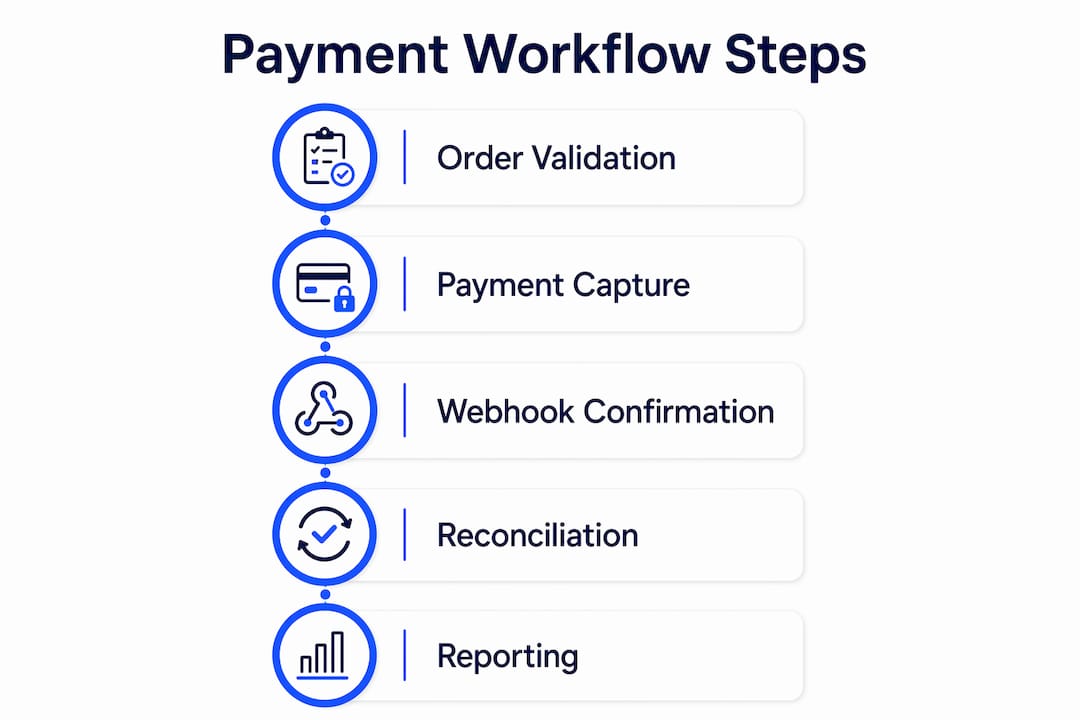
How to design a step-by-step automated payment workflow
The six-step sequence below reflects current best practices for SMEs building or upgrading their payment process. Each step has a specific technical purpose, and skipping any one of them introduces a failure point.
-
Create an authenticated backend order record. Before calling your payment gateway, write a durable order to your database with server-validated pricing, customer ID, and a unique order reference. Backend order creation with validated pricing is the foundation of payment integrity. This record becomes the source of truth for every subsequent step.
-
Generate a secure payment session. Call your gateway API to create a checkout session tied to the order reference. The session object contains a URL pointing to a hosted checkout page. Your server never generates or stores card numbers at this stage.
-
Redirect the customer to the hosted checkout page. The customer enters payment details on a page served by your gateway provider, not your own servers. The success URL your gateway redirects to after payment is a UX signal only. It tells the customer the payment was submitted, but it does not confirm funds were captured. Treat it accordingly.
-
Process cryptographically signed webhook events. Your gateway sends a webhook to your server when a payment is confirmed, failed, or refunded. Webhook endpoints must validate cryptographic signatures on every incoming event before acting on them. This step is where actual payment confirmation happens, not the redirect.
-
Handle events idempotently. Networks are unreliable. Your gateway may send the same webhook event more than once. Implement idempotency keys so your system checks whether an event ID has already been processed before writing to the database. Without this, a single payment can trigger duplicate fulfillment, duplicate receipts, or double-counted revenue.
-
Automate post-payment workflows. Once payment is confirmed, trigger a chain of independent, retryable steps: send a receipt, grant product access, update inventory, and queue the transaction for reconciliation. Post-payment automation improves reliability because each step can fail and retry without affecting the others. Refund handling belongs in this layer too, mapped to specific webhook event types.
Pro Tip: Test your webhook handler locally using a tool like the Stripe CLI before deploying to production. It lets you replay specific event types, including edge cases like payment disputes and partial refunds, without needing live transactions.
What technologies improve payment efficiency and approval rates?
Advanced payment orchestration can increase invoice approval speeds by up to 80% and improve authorization rates by up to 12% through routing optimization. For an SME processing hundreds of transactions per month, a 12% improvement in authorization rates translates directly to recovered revenue that would otherwise appear as declined transactions.
Four technologies drive the majority of those gains.
- Dynamic routing: Evaluates card BIN data, transaction currency, and customer geography in real time to select the processor most likely to approve the transaction. Dynamic routing is the single most critical feature for businesses scaling across multiple markets or currencies.
- Automatic failover: If your primary processor experiences an outage or returns a high decline rate, failover logic redirects transactions to a backup processor without customer-facing interruption. This is the difference between a five-minute outage and a two-hour revenue gap.
- Tokenization and vault portability: Card tokens stored in a payment vault let returning customers pay without re-entering details. Vault portability means you can migrate tokens between processors without asking customers to re-register their cards.
- Centralized reconciliation dashboards: Finance teams need a single view of transaction status, refunds, disputes, and settlement timing across all processors. Without centralization, reconciliation becomes a manual spreadsheet exercise that scales poorly.
Workflow automation that spans purchase orders, invoice capture, payment, and reconciliation gives finance leaders the audit trail and predictability that manual processes cannot provide. SMEs that implement this full stack gain a material advantage in cash flow visibility.
How to troubleshoot common payment workflow problems
Most payment workflow failures fall into three categories: duplicate processing, abandoned transactions, and silent failures that only surface during reconciliation.
Duplicate webhook processing is the most technically damaging. It occurs when your server receives the same event twice and processes it both times. The fix is a two-part check: validate the webhook signature first, then query your database for the event ID before writing any changes. Idempotent event handling is not optional in a production payment system.
Abandoned carts and incomplete sessions are a revenue leak that many SMEs underestimate. A customer who reaches the hosted checkout page but does not complete payment leaves an orphaned order in your database. Build a scheduled job that identifies orders created more than 30 minutes ago without a confirmed payment event and either cancels them or triggers a recovery email.
Silent failures in post-payment steps happen when a receipt email fails to send or an access grant errors out after a successful payment. Because the payment itself succeeded, these failures do not appear in your gateway dashboard. Log every post-payment step independently and set up alerts for failure rates above a defined threshold.
Security is non-negotiable at every layer. Hosted checkouts and tokenization are the only compliant path for handling card data. Any system that processes raw card numbers internally carries full PCI DSS scope, which means quarterly scans, annual audits, and significant liability exposure for an SME.
Pro Tip: Run a full end-to-end test in your production environment at least once per quarter, not just in staging. Production has different network conditions, real processor connections, and live webhook delivery that staging environments do not replicate accurately.
Key takeaways
A well-structured payment workflow integrates backend order validation, hosted checkout, cryptographic webhook confirmation, and automated post-payment processing to deliver both efficiency and compliance.
| Point | Details |
|---|---|
| Backend order first | Always create a server-validated order record before initiating any payment session. |
| Webhooks confirm payment | Redirect success URLs are UX signals only; webhook events are the authoritative payment confirmation. |
| Idempotency prevents errors | Implement idempotency keys to block duplicate processing when webhooks are delivered more than once. |
| Dynamic routing lifts approvals | Routing optimization can improve authorization rates by up to 12%, recovering revenue from declined transactions. |
| Automate post-payment steps | Receipts, access grants, and refunds should run as independent, retryable steps after payment confirmation. |
Why most SMEs are still one step behind on payment workflows
I have reviewed payment setups across dozens of SMEs, and the pattern is consistent. The checkout experience looks polished, but the backend is a patchwork of manual steps, spreadsheet reconciliation, and webhook handlers that have never been tested against edge cases. The gap is not technical knowledge. It is prioritization.
Finance teams treat payment infrastructure as an IT problem, and IT teams treat it as a finance problem. Neither owns the full stack from order creation to reconciliation. That ownership gap is where duplicate charges, unreconciled transactions, and compliance exposures live.
The shift I have seen work is treating the payment workflow as a product, not a utility. That means assigning a clear owner, documenting every step from order creation to settlement, and running quarterly audits of failure logs. Automating business payments is not a one-time project. It is an ongoing operational discipline.
The SMEs that pull ahead are not the ones with the most sophisticated technology. They are the ones that have aligned their finance, IT, and operations teams around a shared understanding of what the payment workflow is supposed to do and what it costs when it fails. Orchestration features like dynamic routing and vault portability are not enterprise luxuries. They are available to any SME willing to move beyond a single-gateway setup and treat payment infrastructure as a strategic asset.
— dd
How Demivolt supports your payment workflow
Demivolt is built for SMEs that need payment infrastructure to work reliably across borders without the compliance overhead of managing it manually. The platform supports dedicated IBAN accounts, SEPA and SWIFT payment management, and role-based access controls that give finance teams the visibility they need without exposing sensitive data to every user. For teams focused on payment accuracy, Demivolt’s IBAN validation tool checks account numbers against ISO 13616 standards before a payment is sent, eliminating the most common cause of SEPA rejections. The free SEPA tools suite extends that capability to transaction validation and payment formatting. If you are building or rebuilding your business banking workflow, Demivolt’s infrastructure gives you a compliant, auditable foundation to work from.
FAQ
What is a payment workflow?
A payment workflow is the structured sequence of steps that processes a payment from initiation to reconciliation within a business system. It includes order creation, payment session generation, gateway processing, webhook confirmation, and post-payment automation.
How long does it take to set up an automated payment workflow?
Setting up and testing an automated payment workflow typically takes 3 to 5 hours for the core configuration, with additional time for ERP integration and edge-case testing in production environments.
Why should I use webhooks instead of redirect URLs to confirm payment?
Redirect success URLs only indicate that a customer submitted payment details. Webhook events, sent directly from your gateway to your server, are the authoritative confirmation that funds were captured and are the correct trigger for fulfillment actions.
What is dynamic routing in a payment workflow?
Dynamic routing selects the best available payment processor for each transaction based on card BIN data, currency, and geography in real time. It is the primary driver of authorization rate improvements, with optimization delivering gains of up to 12%.
How do I prevent duplicate orders from webhook processing?
Implement idempotency keys by storing each webhook event ID in your database and checking for it before processing. If the event ID already exists, discard the duplicate without taking any action.